Loops repeat work without repeating code.
Instead of writing a step 100 times, a loop runs it 100 times for you.
A loop repeats a block of instructions. AP CSP uses two main forms: REPEAT n TIMES, which runs a fixed number of times, and REPEAT UNTIL(condition), which runs until a condition becomes true. This repetition is called iteration.
This topic is part of Big Idea 3: Algorithms and Programming. You will learn the parts of a loop, how counters and accumulators work inside loops, and how to avoid infinite loops.
Why this matters: Loops let short programs do large amounts of work. They are essential on the exam and in the Create Performance Task.
Check, run the body, update, repeat or exit.
Something must change so the loop can stop.
Every loop has a loop body, the instructions that repeat. A REPEAT n TIMES loop runs the body exactly n times. A REPEAT UNTIL loop checks a stopping condition and keeps going until that condition is true.
Loops usually rely on a changing value. A counter tracks how many times the loop has run, and an accumulator builds a total. Inside the loop, you must update these values so the loop eventually ends.
If nothing in the loop ever makes the stopping condition true, the loop never ends. This is an infinite loop, a common and important bug to recognize.
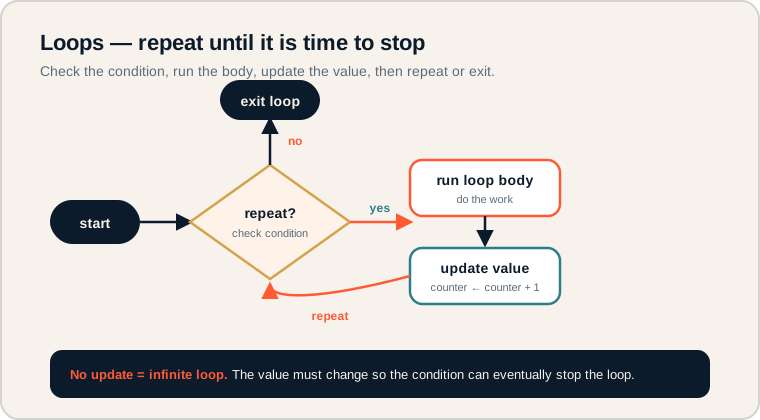
The loop checks the condition, runs the body, updates a value, then repeats or exits.
Follow the cycle: the diamond checks whether to repeat, the body does the work, the value updates, and control loops back to the check. When the condition says stop, the program exits. The footer is the key warning: without an update, the loop runs forever.
The parts of a loop.
These terms appear in loop-tracing questions.
- Loop: a structure that repeats instructions.
- Loop body: the instructions that repeat.
- Iteration: one pass through the loop body.
- Counter: a variable that tracks how many times the loop has run.
- Accumulator: a variable that builds a running total across iterations.
- Stopping condition: the test that ends a REPEAT UNTIL loop.
Memory hook: REPEAT n TIMES counts passes for you. REPEAT UNTIL waits for a condition you must make true.
How loops are tested.
Tracing iterations and counting runs.
Be ready to:
- Trace a loop and predict its output.
- Count how many times a loop body runs.
- Identify counters, accumulators, and stopping conditions.
- Spot an infinite loop or an off-by-one error.
Loop tracing is one of the most tested skills in this unit. Work through each iteration carefully rather than guessing the result.
Exam tip: For REPEAT UNTIL, the loop keeps running while the condition is false and stops once it becomes true. Check the condition after each update.
Display numbers 1 through 5.
A counter drives the repetition.
This loop displays the numbers 1 to 5 using a counter:
number ← 1

REPEAT 5 TIMES
{
    DISPLAY(number)
    number ← number + 1
}
Each iteration displays number, then increases it by 1. The output is 1, 2, 3, 4, 5. The loop runs exactly 5 times because of REPEAT 5 TIMES, and the counter update makes the displayed value climb.
A REPEAT UNTIL loop stops based on a condition instead of a fixed count:
attempts ← 0

REPEAT UNTIL(attempts = 3)
{
    DISPLAY("Try again")
    attempts ← attempts + 1
}
Here the loop runs while attempts is not 3. It displays "Try again" and adds 1 each time, ending after 3 iterations when attempts reaches 3. Without the update attempts ← attempts + 1, the condition would never become true and the loop would run forever.
Loop pitfalls.
These cause wrong counts or endless loops.
- Forgetting to update the counter. Without an update, a REPEAT UNTIL loop never stops.
- Off-by-one errors. Running one time too many or too few is a classic mistake.
- Misunderstanding REPEAT UNTIL. It stops when the condition becomes true, not false.
- Assuming the body runs once. A loop body usually runs many times.
- Creating infinite loops. The stopping condition must be reachable.
Reframe: Every loop needs a reason to stop. Make sure something inside the body moves toward that stopping point.
Loop terms at a glance.
The pieces that make loops work.
| Term | What it is | Example |
|---|---|---|
| Loop | Repeats instructions | REPEAT 5 TIMES |
| Loop body | The repeated instructions | DISPLAY(number) |
| Iteration | One pass through the body | One DISPLAY of a number |
| Counter | Tracks how many runs | number ← number + 1 |
| Accumulator | Builds a running total | total ← total + number |
| Stopping condition | Ends a REPEAT UNTIL loop | attempts = 3 |
Trace one iteration at a time.
Track the counter and any output on every pass.
To trace a loop, make a table with a row per iteration and columns for the counter, any accumulator, and the output. Filling it in one row at a time prevents off-by-one mistakes and shows exactly when the loop stops, which is invaluable on exam loop questions.
Try it: Trace a loop that starts total at 0 and runs total ← total + 2 three times. What is total at the end?
Practice — attempt these now.
AP-style assessments aligned to this lesson. Time them.
AP CSP Big Idea 3 Topic 5: Loops — Set 1
AP-style topic practice assessment
AP CSP Big Idea 3 Topic 5: Loops — Set 2
AP-style topic practice assessment
AP CSP Big Idea 3 Topic 5: Loops — Set 3
AP-style topic practice assessment