Conditionals let a program choose what to do.
An IF statement runs one path when a condition is true and another when it is false.
A conditional lets a program make a decision. It tests a Boolean condition (something that is true or false) and then chooses which block of code to run. This ability to select different paths is called selection.
This topic is part of Big Idea 3: Algorithms and Programming. You will learn how IF and ELSE work, how conditions decide the path, and why boundary cases deserve special attention.
Why this matters: Conditionals appear in nearly every meaningful program and on almost every AP CSP exam. Tracing them correctly is a core skill.
True takes the IF path; false takes the ELSE path.
Only one branch runs each time.
An IF statement checks a condition. If the condition is true, the program runs the IF block. If an ELSE is present and the condition is false, the program runs the ELSE block instead. Exactly one of the two branches runs on a given pass, never both.
Conditions usually compare values using relational operators such as less than (<), greater than (>), or equal to (=). You can also place one conditional inside another, called a nested conditional, to handle more than two cases.
Pay close attention to boundary values, the inputs right at a threshold. Whether a condition uses < or ≤ changes what happens exactly at the boundary, and that is a favorite exam trap.
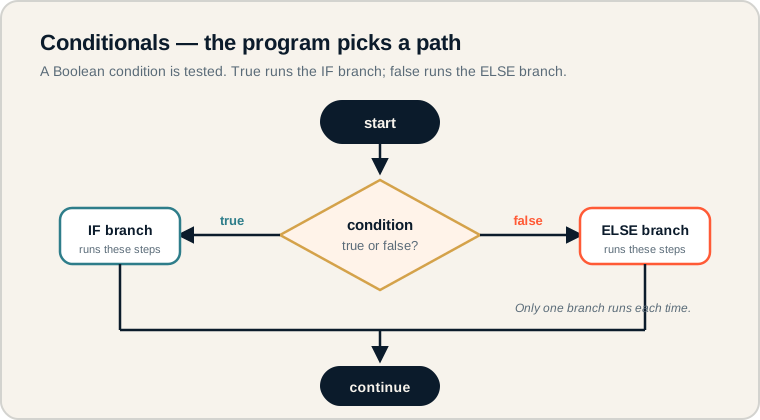
A condition diamond sends the program down the true branch or the false branch.
Start at the top and reach the diamond, where the condition is tested. A true result follows one path (the IF block); a false result follows the other (the ELSE block). Both paths then merge and the program continues. On the exam, trace only the branch the condition selects.
The language of decisions.
Precise terms make exam answers clear.
- Condition: a Boolean expression that is true or false.
- IF: runs a block of code when the condition is true.
- ELSE: runs a block of code when the condition is false.
- Branch: one of the possible paths through a conditional.
- Nested conditional: a conditional placed inside another.
- Boundary value: an input exactly at a threshold in a condition.
Memory hook: IF is the "yes" path, ELSE is the "no" path. The condition decides which one runs.
How conditionals are tested.
Tracing branches and checking boundaries.
Be ready to:
- Determine which branch runs for a given input.
- Predict output when conditions are nested.
- Test boundary values where < and ≤ behave differently.
- Recognize that the ELSE block runs only when the IF condition is false.
Exam questions love inputs that sit exactly on a threshold. Always check what your condition does at that precise value.
Exam tip: For a condition like age < 13, test age = 13 directly. Since 13 is not less than 13, the IF block does not run.
A ticket app with a child discount.
Children under 13 pay less.
A ticket app charges 5 for children under 13 and 10 for everyone else. Here is the AP CSP pseudocode:
age ← INPUT()

IF(age < 13)
{
    price ← 5
}
ELSE
{
    price ← 10
}

DISPLAY(price)
Trace a few inputs:
- age = 10 → 10 < 13 is true, so price becomes 5.
- age = 20 → 20 < 13 is false, so the ELSE runs and price becomes 10.
- age = 13 → 13 < 13 is false, so price becomes 10.
The boundary case is the important one. Because the condition uses < and not ≤, a 13-year-old does not get the discount. If the rule were "13 and under," the condition would need to be age ≤ 13.
Conditional pitfalls.
Avoid these to trace correctly.
- Forgetting ELSE only runs on false. The ELSE block runs only when the IF condition is false.
- Writing unclear conditions. A vague or wrong condition leads to the wrong branch.
- Missing boundary values. Always check the exact threshold input.
- Confusing < and ≤. They differ precisely at the boundary value.
- Assuming both branches run. Only one branch runs on each pass.
Reframe: A conditional is a fork in the road. The condition decides which single path you take.
Conditional terms at a glance.
What each part does.
| Term | What it does | Example |
|---|---|---|
| Condition | Tested as true or false | age < 13 |
| IF | Runs when condition is true | IF(age < 13) |
| ELSE | Runs when condition is false | ELSE { price ← 10 } |
| Branch | A possible path | IF block or ELSE block |
| Nested conditional | A conditional inside another | IF inside an ELSE |
| Boundary value | Input at the threshold | age = 13 |
Always test the boundary input.
It catches the errors examiners hide there.
Whenever a condition compares to a number, test the exact threshold value, plus one just below and one just above. This quickly reveals whether < or ≤ is correct and protects your Create Performance Task logic from off-by-one boundary bugs.
Try it: For a pass mark of "score is at least 60," write the condition. Should it use > or ≥? Test score = 60.
Practice — attempt these now.
AP-style assessments aligned to this lesson. Time them.
No assessments linked yet.
Add topic assessments from the Django admin to surface them here.