Assignment is how variables get and update their values.
The ← operator stores a result into a variable, and it is not the same as equals.
Assignment stores a value into a variable using the arrow ←. The right side is calculated first, then the result is placed into the variable named on the left. This simple rule powers counters, accumulators, and almost every changing value in a program.
This topic continues Big Idea 3: Algorithms and Programming. You will learn to trace assignment statements carefully and to tell assignment apart from an equality comparison.
Why this matters: Misreading assignment is one of the most common tracing errors. Getting it right is essential for predicting program output on the exam.
Right side first, then store on the left.
A variable can even be updated using its own current value.
When you see score ← score + 5, the computer does two things in order. First it evaluates the right side using the current value of score. Then it stores the result back into score, replacing the old value.
This is why a variable can refer to itself in an assignment. If score is 10, then score + 5 gives 15, and that 15 becomes the new value of score. A variable used this way to add up values is called an accumulator; one that counts up by a fixed step is a counter.
The arrow ← means "store into," not "is equal to." That difference matters: assignment changes a value, while an equality comparison only checks whether two values are the same.
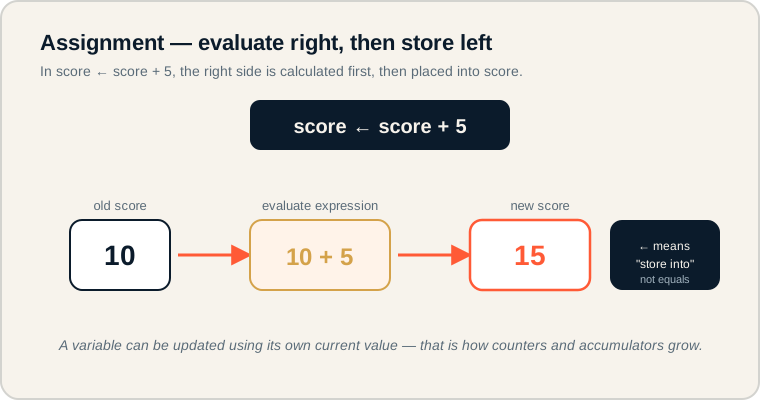
score ← score + 5 shown as old value, evaluated expression, and new value.
Follow the arrows left to right: the old value (10) feeds the expression (10 + 5), which produces the new value (15) stored back into score. On the exam, always compute the right side before updating the variable, and remember ← means store, not equals.
The language of updating values.
These terms appear in many tracing questions.
- Assignment: storing a value into a variable using ←.
- Expression: code on the right side that produces a value.
- Counter: a variable that increases by a fixed amount, often 1.
- Accumulator: a variable that builds up a running total.
- Equality comparison: a test that checks whether two values are equal, written as =.
- Trace: following code line by line to track variable values.
Memory hook: ← changes a value (store into). = checks a value (are these equal?).
How assignment is tested.
Expect step-by-step tracing.
Be ready to:
- Trace a series of assignments and report the final value.
- Recognize that the right side is evaluated before the variable is updated.
- Identify counters and accumulators in pseudocode.
- Distinguish assignment (←) from equality comparison (=).
Many free-response and multiple-choice questions hinge on tracing assignments accurately. A single misread line changes the whole answer.
Exam tip: Write the new value next to each assignment line as you trace. Never compute the whole program in your head.
A score after three correct answers.
Trace each assignment to find the final value.
Each correct answer adds 10 points. Here is the AP CSP pseudocode:
score ← 0
score ← score + 10
score ← score + 10
score ← score + 10
DISPLAY(score)
Trace it line by line, always evaluating the right side first:
- score ← 0 → score is 0.
- score ← score + 10 → 0 + 10 = 10, so score is 10.
- score ← score + 10 → 10 + 10 = 20, so score is 20.
- score ← score + 10 → 20 + 10 = 30, so score is 30.
- DISPLAY(score) shows 30.
Here score acts as an accumulator, building up a total. Each line uses the old value to produce a new one.
Assignment misreadings.
These cause wrong trace results.
- Reading ← as math equality. It stores a value; it is not a balanced equation.
- Forgetting the right side is first. Always evaluate the expression before updating.
- Thinking score ← score + 1 is impossible. A variable can update using its own value.
- Not tracing step by step. Skipping steps leads to errors on long sequences.
- Confusing ← with =. One stores; the other compares.
Reframe: Read score ← score + 1 as "the new score is the old score plus one."
Assignment concepts compared.
Know how these relate and differ.
| Term | What it does | Example |
|---|---|---|
| Assignment | Stores a value into a variable | score ← 10 |
| Expression | Produces a value to store | score + 10 |
| Counter | Increases by a fixed step | count ← count + 1 |
| Accumulator | Builds a running total | total ← total + price |
| Equality comparison | Checks if values are equal | score = 10 |
Keep a running trace table.
It turns tricky assignment chains into easy bookkeeping.
For any sequence of assignments, draw a small table with one column per variable and one row per line. Update the value every line. This habit eliminates careless mistakes and is exactly how you should trace assignments under exam pressure.
Try it: Trace total ← 0, then total ← total + 4, then total ← total + 6. What is the final value of total?
Practice — attempt these now.
AP-style assessments aligned to this lesson. Time them.
AP CSP Big Idea 3 Topic 2: Assignment — Set 1
AP-style topic practice assessment
AP CSP Big Idea 3 Topic 2: Assignment — Set 2
AP-style topic practice assessment
AP CSP Big Idea 3 Topic 2: Assignment — Set 3
AP-style topic practice assessment