Build the program with the written responses already in mind.
The Create task is not only a coding project. It is a coding project you must be able to prove and explain.
The Create performance task is the through-course component of AP Computer Science Principles. Alongside the end-of-course digital exam, it asks you to design and implement a program of your own choosing and then demonstrate that you understand every part of it.
The program itself is genuinely open. It may solve a problem, explore a personal interest, enable innovation, or simply express creativity. A budgeting tool, a quiz trainer, a habit tracker, a music-recommendation experiment, and a small game are all legitimate directions. What is not open is the evidence your program must contain and the way that evidence must be captured.
You submit three components:
- Program code — the complete code for your program, including any acknowledgements of outside contributions.
- Video — a short demonstration of your program running, showing input and the resulting output, created according to the current task requirements.
- Personalized Project Reference (PPR) — a small set of code screenshots that you take into the exam room.
The Personalized Project Reference deserves special attention because it is the only piece of your project that travels with you to exam day. It contains four categories of code evidence drawn from your own program, and on the exam you will use it to answer two written-response questions containing four distinct prompts:
- Written Response 1: Program Design, Function, and Purpose
- Written Response 2(a): Algorithm Development
- Written Response 2(b): Errors and Testing
- Written Response 2(c): Data and Procedural Abstraction
Your PPR is only available to you in the exam if it has been submitted as final by the official deadline shown in the AP Digital Portfolio or current AP schedule. If it is not final, you sit the written responses with nothing in front of you — an entirely avoidable disaster.
You are given at least nine hours of in-class time to complete the task. The program code may be developed independently or collaboratively, but the video and the Personalized Project Reference must be created independently. That single rule shapes how you should plan: whatever help you have while building, you alone must be able to select the evidence and explain it.
This is why backward planning matters so much. Students who build first and hunt for evidence afterwards routinely discover that their loop is outside their procedure, that their parameter changes nothing, or that their "list" is decoration. Students who decide where the evidence will live before they write code almost never have that problem.
The core idea of this lesson: A successful project is not merely a working app. It is a program whose required evidence can be clearly identified, captured, and explained.
Plan the evidence, then write the code around it.
A small, defensible program beats a large program whose evidence is scattered.
Every strong Create task follows roughly the same nineteen-step arc. Read it once as a workflow, then read it again as a checklist.
- Select a manageable program idea. Something you can finish, test, and explain — not something you hope to finish.
- Define the purpose and intended users. One precise sentence. "This program helps students find unfinished tasks for a chosen subject."
- Plan input and output. Input may come from a user, a device, an online data stream, or a file. Output may be visual, textual, audible, or tactile.
- Identify the list or other collection that will hold your data.
- Explain how that collection manages complexity. If you cannot say why separate variables would be worse, redesign now, not later.
- Design a student-developed procedure. It needs a name and, where applicable, a return type.
- Add a meaningful parameter. At least one parameter must genuinely affect what the procedure does.
- Place sequencing, selection, and iteration inside that procedure. All three must live in the algorithm you select as evidence.
- Call the procedure elsewhere in the program. A definition with no call is not usable evidence.
- Build the program.
- Test normal, boundary, and invalid cases.
- Debug the errors you find.
- Prepare the program video — one minute or less, created independently, following the current task requirements.
- Capture the full program code for submission, including acknowledgements.
- Select procedure-definition and procedure-call evidence.
- Select list-storage and list-use evidence — from the same list.
- Create readable PPR screenshots with no comments.
- Submit every component as final by the official deadline shown in the AP Digital Portfolio or current AP schedule.
- Practise the four written-response categories using your own PPR.
Notice where the evidence decisions sit: steps 4 through 9, before a single line of the finished program is written. That ordering is the whole strategy. Ambitious projects fail the Create task not because they are bad programs, but because their required features end up in the wrong places — the loop in the main body, the list touched once and forgotten, the parameter passed but never used.
A modest program with a clean, well-placed procedure and one genuinely useful list will earn every point available and will be far easier to explain under exam pressure. Scope down. Explain up.
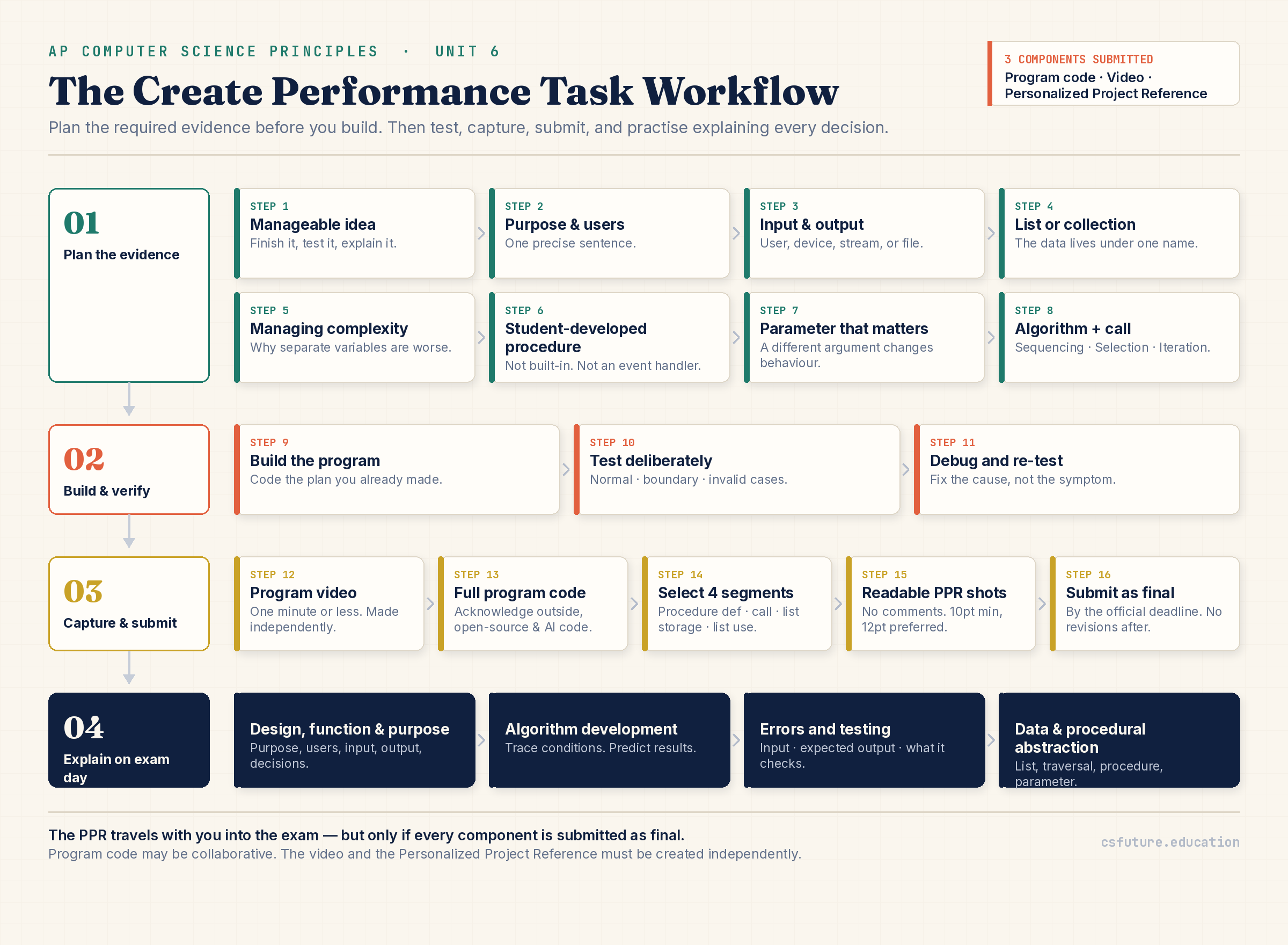
Create task workflow: plan the required evidence before building, then test, capture, submit, and practise explaining.
Read the workflow left to right. The first band — idea, purpose, input/output, list, procedure, parameter, algorithm, call — is entirely planning. Nothing is built yet, but every requirement already has an address inside the future program. This is what "designing for evidence" means in practice.
The second band — build, test, debug — is where most students believe the task lives. It is important, but it is only the middle of the story. Testing here is not decoration: the normal, boundary, and invalid cases you construct now become raw material for the Errors and Testing prompt later.
The third band — video, code capture, evidence selection, screenshots, final submission — converts a working program into an assessable artefact. If a step in band one was skipped, band three is where the damage becomes visible, and by then it is usually too late to fix.
The final band — practise the four written-response categories — is the one students most often omit. Your PPR is not a comfort object; it is a working document you must be able to read out loud, line by line, and justify.
The exact words the written responses will use.
Vague vocabulary produces vague answers, and vague answers score nothing.
- Create Performance Task: the through-course project in which you design, implement, test, and explain a program of your own choosing.
- Personalized Project Reference (PPR): the set of code screenshots drawn from your program that you take into the exam and use to answer the written responses.
- Program Purpose: the problem the program solves, the interest it explores, or the creative goal it achieves — stated in terms of what it does for someone.
- Program Function: what the program actually does when it runs — the observable behaviour, including how input becomes output.
- Input: data the program receives from a user, a device, an online data stream, or a file.
- Output: what the program produces — visual, textual, audible, or tactile.
- List: an ordered collection of elements that can be accessed and traversed, used here to manage many related values under one name.
- Collection: any structure that groups multiple values together; a list is the most common form in AP CSP.
- Data Abstraction: managing complexity by representing many values with a single named structure instead of many separate variables.
- Student-Developed Procedure: a procedure you wrote yourself. Built-in procedures, event handlers, and main methods do not count.
- Parameter: an input to a procedure that allows the same procedure to behave differently depending on the value passed in.
- Procedural Abstraction: managing complexity by naming a block of logic so it can be called from elsewhere without re-stating its detail.
- Algorithm: a finite sequence of steps that accomplishes a task; the one you select must contain sequencing, selection, and iteration.
- Sequencing: statements executed in a defined order, where the order genuinely matters.
- Selection: a decision point — the program takes one path or another based on a Boolean condition.
- Iteration: a repeated section of code, such as a loop that traverses a list.
- Test Case: a specific input, paired with the behaviour you expect, used to check one aspect of the program.
- Expected Output: what the program should produce for a given input, stated before you run it.
- Boundary Case: an input at the edge of the valid range — the first element, the last element, an empty list, a single-item list.
- Debugging: locating the cause of incorrect behaviour and correcting it, then re-testing.
Memory hook: INPUT → LIST → PROCEDURE → PARAMETER → SELECTION → ITERATION → OUTPUT → EXPLANATION. Walk that chain through your own program. If any link is missing or forced, your evidence is not ready.
Four prompts, two questions, one program you must know cold.
Pointing at code earns nothing. Explaining how it functions and why it serves the purpose earns everything.
On exam day, the written responses are answered with your Personalized Project Reference in front of you. There are two questions containing four distinct prompts. Prepare for each one deliberately.
A. Written Response 1 — Program Design, Function, and Purpose
This is the "explain your program to a stranger" prompt. Be ready to state:
- the overall purpose of the program — what it is for, not just what it contains;
- the intended users and why the program is useful to them;
- the function of a specified code segment — what those particular lines accomplish;
- the program input and where it comes from;
- the program output and its form;
- a design or development decision you made, and the reasoning behind it;
- how the interface supports the purpose — how the user reaches the functionality.
Weak answers describe features. Strong answers connect every feature back to the purpose: "The user selects a subject because the whole point of the program is to reduce a long task list down to what is relevant right now."
B. Written Response 2(a) — Algorithm Development
Here you reason about the algorithm inside your selected procedure. Be ready to:
- explain how the algorithm works, step by step, in order;
- trace conditions and evaluate Boolean expressions for given values;
- explain the role of selection — what decision is made, and what happens on each branch;
- explain the role of iteration — what is repeated, over what, and when it stops;
- predict the result of running the algorithm on specific data, including side effects;
- modify or combine algorithms — describe what changes if a condition or bound is altered;
- express an algorithm without relying on a specific language, using plain steps or AP-style pseudocode.
C. Written Response 2(b) — Errors and Testing
This prompt asks you to think like a tester, not a coder. Be ready to:
- identify a possible error in a given or described code segment;
- state a correction that fixes it without breaking other behaviour;
- construct valid test cases that actually test something;
- state the input for each test case precisely;
- state the expected output or behaviour — before running anything;
- distinguish normal, boundary, and invalid cases and explain what each one checks.
A test case is not "I ran the program and it worked." A test case is a stated input, a stated expected result, and a stated reason the case matters.
D. Written Response 2(c) — Data and Procedural Abstraction
This is the prompt built directly on your four PPR segments. Be ready to:
- identify the list you selected and describe the data it holds;
- explain how that list manages complexity — specifically, why writing the program with individual variables instead would make it harder to develop or maintain;
- explain the traversal — how the list is accessed, element by element, and to what end;
- identify your student-developed procedure and what it does;
- explain how procedural abstraction manages complexity — how naming that logic keeps the rest of the program simple and reusable;
- explain the effect of the parameter — how a different argument produces different behaviour.
Evidence Check — run this before you call your PPR finished:
- Segment 1 shows the definition of a procedure I wrote myself.
- That definition shows a name, a return type where applicable, and one or more parameters.
- At least one parameter meaningfully affects what the procedure does.
- The procedure body contains sequencing, selection, and iteration.
- Segment 2 shows a call to that same procedure.
- Segment 3 shows data being stored in a list or collection.
- Segment 4 shows data from the same list being used to fulfil the program purpose.
- No screenshot contains comments, notes, or annotations.
- Every screenshot is readable and shows only the necessary code.
The single most important exam habit: naming is not explaining. "Line 4 is my iteration" earns nothing. "Line 4 repeats once for each task in studyTasks, which lets the program check every stored task without knowing in advance how many there are" is an answer.
A study planner, dissected the way an examiner would.
One small program, four clean pieces of evidence, three real test cases.
Consider a Study Planner application. Its purpose is to help a student see, at a glance, which tasks remain unfinished for one chosen subject. Each stored task records a name, a subject, a priority, and a completion status.
List-storage evidence. Tasks are added to a single list, studyTasks:
studyTasks ← []

PROCEDURE addTask(name, subject, priority)
{
    newTask ← createTask(name, subject, priority, false)
    APPEND(studyTasks, newTask)
}
This is the segment that shows data being stored in a list. Every task the user adds, whatever the subject, lands in the same collection under one name.
Procedure-definition evidence. The student-developed procedure below takes the chosen subject as a parameter and reports the unfinished tasks for it:
PROCEDURE showTasksBySubject(selectedSubject)
{
    matchFound ← false

    FOR EACH task IN studyTasks
    {
        IF task.subject = selectedSubject AND task.completed = false
        {
            DISPLAY(task.name)
            matchFound ← true
        }
    }

    IF matchFound = false
    {
        DISPLAY("No unfinished tasks found")
    }
}
Procedure-call evidence. The procedure is called from the part of the program that handles the user's choice:
selectedSubject ← INPUT("Enter a subject: ")
showTasksBySubject(selectedSubject)
List-use evidence. The FOR EACH task IN studyTasks traversal inside the procedure is the segment showing data from the same list being used to fulfil the program purpose. Notice that storage and use refer to the same list. This is not optional — a PPR that stores into one list and reads from a different one fails the requirement outright.
Now walk the evidence chain deliberately:
- Program purpose: to reduce a long, mixed task list down to the unfinished work for one subject, so a student can decide what to do next.
- Input: the subject typed by the user.
- Output: a textual display of matching task names, or a clear message when there are none.
- Data abstraction: studyTasks holds every task under a single name. Without it, each task would need its own set of variables, and the program would have to be rewritten every time the number of tasks changed. The list lets one traversal handle any number of tasks.
- Procedural abstraction: showTasksBySubject names a block of logic — traverse, filter, display, handle the empty result — so the rest of the program can request that behaviour in one line and never repeat the detail.
- Parameter effect: selectedSubject is compared against every task's subject. Passing
"Physics"displays a different set of tasks than passing"History". Change the argument and you change the output — that is what "meaningfully affects functionality" means. - Sequencing: matchFound is initialised to
falsebefore the loop and checked after it. Reverse those two and the procedure breaks. The order carries meaning. - Selection: the
IFinside the loop decides whether a task is displayed, using a compound Boolean condition. A secondIFafter the loop decides whether the "no results" message appears. - Iteration: the
FOR EACHrepeats the check once for every task in studyTasks, regardless of how many there are.
Three test cases. These are the kind of cases the Errors and Testing prompt expects — each with a stated input, a stated expected output, and a stated reason.
- 1. Normal case. Input: the list contains three Physics tasks (two unfinished, one completed) and two History tasks; the user enters
"Physics". Expected output: the names of the two unfinished Physics tasks only. Checks: the compound condition correctly filters both by subject and by completion status, and the traversal reaches every element. - 2. No-match case. Input: the list contains only completed Physics tasks; the user enters
"Physics". Expected output:"No unfinished tasks found". Checks: matchFound remainsfalse, the post-loop selection fires, and the program does not simply display nothing. - 3. Boundary case. Input: studyTasks is empty; the user enters any subject. Expected output:
"No unfinished tasks found". Checks: the loop body never executes, the initialisation before the loop still protects the program, and no error is raised on an empty collection.
A fourth case worth constructing for practice is the invalid case: the user enters a subject that does not exist in the data, or enters an empty string. The program should behave predictably rather than crashing — which is exactly the kind of behaviour an exam prompt will ask you to defend or correct.
Note: This example exists to model how evidence is selected and explained. It is an instructional model only, not a program that may be submitted as your own work. Your Create task must be your own program, built by you.
The failures that cost points every single year.
Almost all of them are decided during planning, not during coding.
Design and scope
- Choosing an oversized project. An ambitious half-finished program is worth less than a small complete one whose evidence is airtight.
- Selecting a decorative list. A list that stores three fixed values and is never traversed does not manage complexity. It just exists.
- Storing values in a list but never meaningfully using them. Storage evidence without genuine use evidence fails the requirement.
- Selecting different lists for the storage and use segments. Both segments must involve the same list.
Procedure and algorithm
- Using a built-in procedure instead of a student-developed one. Built-in procedures, event handlers, and main methods do not count.
- Having no procedure call. A definition alone is incomplete evidence.
- Using a parameter that does not affect behaviour. If passing a different argument produces identical output, the parameter is not meaningful.
- Placing selection or iteration outside the selected procedure. All three constructs must appear in the algorithm inside the procedure you select.
- Assuming several lines automatically prove sequencing. Sequencing means the order matters. Be able to say what breaks if two statements are swapped.
PPR capture
- Capturing comments in PPR screenshots. Comments must not appear in the PPR. Remove or exclude them before capture.
- Including course notes, explanations, or annotations in the screenshots. Only the code evidence belongs there.
- Using tiny or blurry screenshots. Unreadable evidence is unusable evidence.
- Capturing code that is too wide. Long horizontal lines shrink the font and destroy readability.
Process and integrity
- Preparing the PPR collaboratively. The PPR must be created independently.
- Creating the video collaboratively. The video must also be created independently.
- Failing to submit every component as final. A PPR that is not final by the official deadline is not available to you in the exam.
- Misunderstanding code produced with outside or AI assistance. If you cannot explain it, it will sink you in the written responses.
- Memorising generic answers instead of understanding your actual code. Exam prompts point at your segments; rehearsed phrases collapse instantly.
- Never practising testing and expected-output prompts. This is a distinct skill and it is examined every year.
Reframe: Design for evidence, readability, and explanation—not merely for functionality.
Requirement, evidence, explanation.
Use this as a pre-submission audit grid.
| Requirement | Evidence to Capture | What You Must Explain | Weak Evidence | Strong Evidence |
|---|---|---|---|---|
| Program Purpose | Stated in the video and in your own words | What problem, interest, or creative goal the program serves, and for whom | "It's an app about tasks." | "It filters a mixed task list down to unfinished work for one subject." |
| Input | Code where data enters the program | Source of the input (user, device, data stream, file) and how it is used | Hard-coded value never supplied at run time | User-entered subject passed directly into the procedure |
| Output | Code producing visible or audible result | What is produced, its form, and how it depends on the input | Output identical regardless of input | Displayed results change with the chosen subject |
| List Storage | Segment showing data placed into the list | What is stored and why it belongs in a collection | Fixed three-element list never added to | Tasks appended as the user creates them |
| List Use | Segment using data from the same list | How the stored data drives the program's purpose | List printed once for display only | List traversed and filtered to produce the result |
| Data Abstraction | Both list segments together | Why separate variables would be harder to develop or maintain | "A list is easier." | "One traversal handles any number of tasks; variables would need rewriting." |
| Procedure Definition | Segment showing the full definition you wrote | Name, return type where applicable, parameters, and what it does | A built-in procedure or event handler | A named procedure you wrote, with parameters and a clear job |
| Procedure Call | Segment showing a call to that same procedure | Where it is called from and what argument is supplied | A call to a different procedure | Call passing the user's input into the selected procedure |
| Parameter | Visible in the definition and the call | How a different argument changes the procedure's behaviour | Parameter accepted but never referenced | Parameter tested inside the condition that controls output |
| Sequencing | Ordered statements inside the procedure | Why the order matters and what breaks if it changes | "There are several lines." | "The flag is set before the loop and checked after it." |
| Selection | Conditional inside the procedure | The Boolean condition and what happens on each path | "There is an IF statement." | "The IF displays a task only when subject matches and it is unfinished." |
| Iteration | Loop inside the procedure | What repeats, over what data, and when it stops | "There is a loop." | "The loop runs once per element, so any list size is handled." |
| Testing | Your own recorded test cases | Input, expected output, and what the case checks | "I ran it and it worked." | Normal, boundary, and invalid cases each with a stated expectation |
| PPR Readability | Four clean screenshots | Nothing — but unreadable evidence cannot be explained | Blurry, zoomed-out, comment-filled capture | Sharp capture, at least 10-point font, 12-point preferred, no comments |
| Academic Integrity | Acknowledgements in the full program code | What came from outside sources and that you understand every line | Borrowed code you cannot explain | Acknowledged sources plus a confident line-by-line explanation |
The PPR Readiness Audit.
Sixteen questions. Answer every one out loud, from your own screenshots.
Sit down with your Personalized Project Reference and nothing else. No notes, no editor, no teammate. Work through the list in order.
- Can I state my program's purpose in one precise sentence?
- Can I identify the program input and output?
- Can I point to the exact list used to manage complexity?
- Do my two list code segments use the same list?
- Does one segment show data being stored?
- Does the other show the same data being used?
- Can I explain why separate variables would be harder to develop or maintain?
- Can I identify my student-developed procedure?
- Does the selected definition contain a meaningful parameter?
- Does the parameter change the procedure's functionality?
- Does the procedure body contain sequencing, selection, and iteration?
- Can I show a call to that exact procedure?
- Can I explain the algorithm step by step?
- Can I produce normal, boundary, and invalid test cases?
- Are all PPR screenshots readable and free of comments?
- Can I explain every selected line without relying on memorised generic language?
Any "no" or "not sure" is a task, not a worry. Fix it while the program is still editable; after final submission, the evidence is locked and you must live with it.
Screenshot craft. A few practical habits protect readability:
- Capture at the size you intend to read. Do not zoom far out and enlarge afterwards — that produces blur.
- Use at least a 10-point font; 12-point is preferable where practical.
- Avoid very wide lines. Break long statements before capturing.
- Long code segments may be captured in multiple readable sections rather than one shrunken image.
- Show only the necessary code evidence — no surrounding clutter, no comments, no annotations.
On outside help and AI-assisted code. Outside code, media, data, APIs, starter code, open-source code, and AI-assisted code must be properly acknowledged in the complete program-code submission. Those acknowledgements and comments belong in the full code file where appropriate — never inside the PPR screenshots. More importantly, you remain responsible for understanding every line you submit. AI-generated code frequently contains errors, bias, inefficiency, or complexity you did not need, and the exam will ask you to explain your code, not the tool's. During the official administration of the task, follow the current assistance and collaboration rules given to you by your teacher and College Board. The simple test: if you cannot explain a line without help, it should not be in your program.
Try it: Explain your four PPR segments aloud to someone who has never seen your program — a friend, a family member, an empty room. Speaking forces you to convert recognition into explanation, which is exactly the gap the written responses are designed to expose.
Create Task Readiness Check.
Analyse someone else's program the way an examiner will analyse yours.
Scenario. A student builds a fitness tracker. It stores daily step counts in a list, asks the user for a start day and an end day, calculates the average steps across that range, ignores any invalid or missing values, and displays the result.
dailySteps ← [8200, 10400, -1, 9600, 12100, 0, 7400]

PROCEDURE calculateAverage(startDay, endDay)
{
    total ← 0
    validCount ← 0
    day ← startDay

    REPEAT UNTIL (day > endDay)
    {
        steps ← dailySteps[day]

        IF (steps > 0)
        {
            total ← total + steps
            validCount ← validCount + 1
        }

        day ← day + 1
    }

    IF (validCount = 0)
    {
        RETURN(0)
    }

    RETURN(total / validCount)
}

start ← INPUT("Start day: ")
end ← INPUT("End day: ")
average ← calculateAverage(start, end)
DISPLAY("Average steps: ")
DISPLAY(average)
Answer all eighteen questions before reading the model answers.
- What is the program purpose?
- What are the inputs?
- What is the output?
- Identify the list-storage evidence.
- Identify the list-use evidence.
- Explain how the list manages complexity.
- Identify the procedure.
- Identify its parameters.
- Explain how each parameter affects behaviour.
- Identify sequencing.
- Identify selection.
- Identify iteration.
- Give a normal test case.
- Give a boundary test case.
- Give an invalid-data test case.
- State the expected output for each.
- Would the selected procedure be suitable PPR evidence? Explain.
- What screenshot-readability checks should be performed?
Model answers below. Attempt every question first. Comparing your wording with the model wording is where the learning happens.
1. Program purpose. The program helps a user understand their recent activity by reporting the average number of steps taken across a range of days they choose, while ignoring days where the data is missing or invalid.
2. Inputs. Two user-supplied values: the start day and the end day of the range.
3. Output. A textual display of the average step count for the selected range, or 0 when no valid data exists in that range.
4. List-storage evidence. The line where dailySteps is populated with step counts. In a real submission this would be the code that adds each day's value to the list.
5. List-use evidence. The line steps ← dailySteps[day] inside the loop, where values are read from the same list and accumulated. Both segments involve dailySteps, which is what the requirement demands.
6. How the list manages complexity. Every daily step count lives under one name and is reached by index. A single loop handles a range of any length. With separate variables — day1, day2, day3 — the programmer could not iterate over a user-chosen range at all; every additional day would require new code. The list is what makes a flexible range possible.
7. The procedure. calculateAverage, a student-developed procedure with a return value.
8. Its parameters. startDay and endDay.
9. How the parameters affect behaviour. startDay sets the index where the traversal begins; endDay controls the condition that stops it. Passing (0, 2) averages a different set of days than passing (3, 6). Both parameters directly determine which elements are read and therefore what value is returned — they meaningfully affect functionality.
10. Sequencing. total, validCount, and day are initialised before the loop; the division happens after it. If the accumulator were reset inside the loop, or the average computed before the traversal, the result would be wrong. The order is doing real work.
11. Selection. IF (steps > 0) decides whether a value counts toward the average, filtering out the invalid -1 and the empty 0. A second selection, IF (validCount = 0), guards against dividing by zero.
12. Iteration. The REPEAT UNTIL (day > endDay) loop traverses the requested range one index at a time.
13. Normal test case. Input: start day 0, end day 4 (values 8200, 10400, −1, 9600, 12100). Expected output: the average of the four valid values, 10075. Checks that the traversal covers the range, that the invalid value is excluded, and that the division uses the count of valid entries rather than the range length.
14. Boundary test case. Input: start day 6, end day 6 — a single-day range at the last index. Expected output: 7400. Checks that the loop executes exactly once when start and end are equal, and that the final element is reachable rather than skipped by an off-by-one condition.
15. Invalid-data test case. Input: start day 5, end day 5 (the stored value is 0, treated as missing). Expected output: 0, produced by the validCount = 0 guard rather than by a division error. Checks that the program degrades gracefully when no usable data exists in the chosen range.
16. Expected outputs. Stated in each case above: 10075, 7400, and 0 respectively. Notice that each expectation is written down before running the program — that is what separates a test case from an observation.
17. Suitability as PPR evidence. Yes. calculateAverage is student-developed rather than built in; it has a name and a return value; it has parameters, and both meaningfully affect the outcome; its body contains sequencing (initialise, accumulate, divide), selection (two conditionals), and iteration (the range traversal); and it is called elsewhere in the program with the user's input. It also touches the same list used for storage, so the list-use evidence can be drawn from inside it. Every requirement has an address.
18. Screenshot-readability checks. Confirm that the captured code contains no comments and no annotations; that the font is at least 10-point, ideally 12-point; that the image is sharp rather than zoomed out and enlarged; that no line runs so wide it forces the text small; that a long procedure is split into multiple readable captures if needed; and that only the necessary evidence appears, with no surrounding clutter.
Now do it to your own program. Run these same eighteen questions against your Create task. The ones you struggle to answer are precisely the ones the exam will ask.
Practice — attempt these now.
AP-style assessments aligned to this lesson. Time them.
No assessments linked yet.
Add topic assessments from the Django admin to surface them here.