Compression makes data smaller so it stores and travels faster.
The key question is whether you can afford to lose any detail.
Compression reduces the size of a file. Smaller files take up less storage and move faster across networks. There are two broad approaches: lossless, which rebuilds the original exactly, and lossy, which throws away some detail to save more space.
This topic is part of Big Idea 2: Data. You will learn the trade-off between size and quality and when each kind of compression is appropriate.
Why this matters: Compression choices affect everything from how fast a website loads to whether a backup file can be perfectly restored.
Lossless keeps everything; lossy trades detail for size.
Both shrink files, but only one can rebuild the original perfectly.
Lossless compression finds repeated patterns and stores them more efficiently, then restores the file exactly when uncompressed. Nothing is lost. This is essential for text, code, and any file that must stay identical.
Lossy compression permanently removes detail the human eye or ear is unlikely to notice. It usually achieves much smaller files, which is why it is used for photos, music, and video, but the original cannot be perfectly recovered.
The compression ratio describes how much smaller the file became. Higher compression saves more space but, for lossy methods, can reduce quality. The right choice depends entirely on the file's purpose.
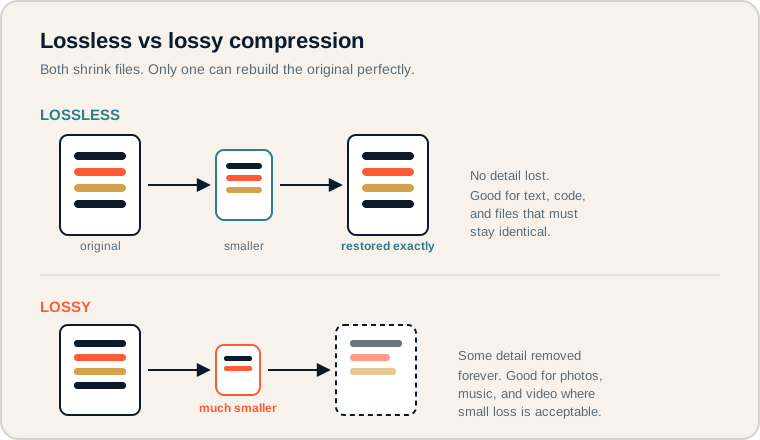
Lossless restores the file exactly; lossy produces a smaller file with some detail removed.
Follow each row left to right. In the top row the restored file matches the original perfectly. In the bottom row the file is smaller, but the dashed outline and faded bars show detail that is gone for good. On the exam, match the method to whether exact recovery is required.
Compression terms.
Know the trade-offs each term describes.
- Compression: reducing the number of bits needed to store data.
- Lossless: compression that can restore the original data exactly.
- Lossy: compression that permanently discards some detail to save more space.
- Compression ratio: how much smaller the compressed file is compared to the original.
- Quality: how closely the result matches the original.
- Transmission speed: how quickly a file can be sent; smaller files travel faster.
Memory hook: Lossless = "loss-less" = no loss. Lossy = "loss-y" = some loss. The names describe exactly what happens.
How compression is tested.
Expect trade-off reasoning, not formulas.
Be ready to:
- Choose lossless or lossy for a given situation and justify it.
- Explain the trade-off between file size and quality.
- Recognize that compression affects storage and transmission speed.
- Identify that lossless is required when data must be preserved exactly.
The exam values clear reasoning about purpose. The correct answer connects the compression type to what the file is used for.
Exam tip: If the scenario involves text, code, or anything that must be reconstructed perfectly, the answer is lossless. If small quality loss is acceptable for a much smaller file, lossy fits.
Compressing images for a school website.
The best choice depends on the purpose.
A school website has large image files that load slowly. Which compression should they use?
For photos in the news gallery: lossy compression is usually best. Visitors will not notice slight quality loss, and the much smaller files make pages load faster, improving the experience.
For a downloadable logo or official document scan that must stay crisp: lossless compression is better, because the image needs to remain exact when reused or printed.
The reasoning is about purpose, not size alone. Faster loading favors lossy for casual photos, while accuracy favors lossless for files that must be preserved. A good answer states the purpose, names the method, and explains the trade-off.
Compression misconceptions.
These confusions are common on the exam.
- Thinking compression always loses quality. Lossless compression keeps everything.
- Thinking smaller is always better. Over-compressing can ruin important detail.
- Using lossy when exact data is required. Text and code must stay identical, so lossy is wrong there.
- Forgetting the effect on transfer. Compression also changes upload and download time.
- Confusing compression with encryption. Compression shrinks data; encryption protects it. They are different goals.
Reframe: Ask "Must this be rebuilt exactly?" If yes, lossless. If a little loss is fine for big savings, lossy.
Lossless vs lossy at a glance.
Compare the trade-offs side by side.
| Aspect | Lossless | Lossy |
|---|---|---|
| Restores original | Exactly | No, detail removed |
| Compression ratio | Smaller savings | Larger savings |
| Quality | Fully preserved | Reduced |
| Storage | Moderate savings | Major savings |
| Transmission speed | Faster than original | Fastest |
| Best for | Text, code, exact files | Photos, audio, video |
Always justify with the file's purpose.
Examiners reward the reason, not just the choice.
When a question asks which compression to use, write your answer as "Use [method] because the file needs to [purpose]." Naming the purpose, such as "must be restored exactly" or "needs to load quickly," shows the reasoning that earns full marks.
Try it: Decide the best compression for a song, a legal contract, and a background photo. Justify each with one sentence about its purpose.
Practice — attempt these now.
AP-style assessments aligned to this lesson. Time them.
AP CSP Big Idea 2 Topic 3: Data Compression — Set 1
AP-style topic practice assessment
AP CSP Big Idea 2 Topic 3: Data Compression — Set 2
AP-style topic practice assessment
AP CSP Big Idea 2 Topic 3: Data Compression — Set 3
AP-style topic practice assessment
AP CSP Big Idea 2 Topic 3: Data Compression — Set 4
AP-style topic practice assessment