Data types tell the computer what a value means.
The same bits can be a number, a letter, or a yes/no answer, depending on the type.
A data type is a category that describes what kind of value something is and what you can do with it. Choosing the right type matters: you can do math with numbers, join text together, and test true/false conditions, but each only works for the correct type.
This topic continues Big Idea 2: Data. You will meet the common data types in AP CSP and learn why type choice affects which operations are possible.
Why this matters: On the Create Performance Task, choosing appropriate data types, especially lists, makes your program cleaner and easier to explain.
Five categories cover most AP CSP data.
Numbers, strings, Booleans, lists, and media.
Most values you work with fall into a handful of types:
- Number: a value used in calculations, like 42 or 3.5.
- String: text made of characters, like "Hello" or a username.
- Boolean: a value that is only true or false.
- List: an ordered collection of values, like [3, 8, 10].
- Media: images, audio, and video, which are also data represented in binary.
The type controls the operations. You can add two numbers, but adding two strings usually joins them instead. A Boolean can drive a decision but cannot be multiplied. Picking the right type up front prevents confusing bugs later.
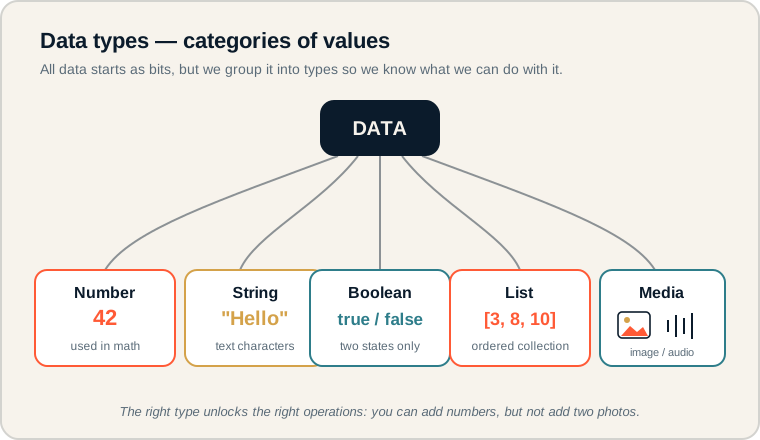
Data branches into Number, String, Boolean, List, and Media, each with a small example.
Start at the center node and follow each branch to a type and its example value. Notice that all types ultimately come from the same bits, but the label changes what the value means and what you can do with it. On the exam, match each value to the type that allows the operation the program needs.
Naming the categories.
Precise terms make exam answers clear.
- Number: a numeric value used for arithmetic and comparison.
- String: a sequence of characters treated as text.
- Boolean: a value that is either true or false, used in logic and decisions.
- List: an ordered collection that stores many values under one name.
- Element: a single value inside a list.
- Media data: images, audio, or video stored as binary data.
Memory hook: Quotation marks usually signal a string. "5" is text; 5 is a number you can do math with.
How data types appear on the exam.
Lists and Booleans show up often.
Be ready to:
- Choose the best data type for a described value.
- Recognize that a list stores many related values without many separate variables.
- Understand that a Boolean is true/false, not the words "yes" or "no" as text.
- Explain why storing a number as a string blocks calculations.
The Create Performance Task specifically rewards effective use of a list (or other collection). Knowing when a list is the right type is directly useful for your score.
Exam tip: When several related values would otherwise need many variables (item1, item2, item3...), the intended answer is almost always a list.
Choosing types for a fitness tracker.
Match each value to the type that fits its job.
A fitness tracker app stores four pieces of data. Which type fits each?
- steps → Number, because the app counts and compares step totals.
- username → String, because it is text shown on screen.
- goalReached → Boolean, because the goal is either met (true) or not (false).
- dailyStepsList → List, because it holds many daily values together.
In AP CSP style, the list could look like this:
dailyStepsList ← [4200, 8100, 6750, 9300]Storing the daily values in one list is far better than making four separate variables. The program can loop through the list, total it, or find the largest value, all using one name.
Type confusion to avoid.
These cause real bugs and lost exam points.
- Storing numbers as strings. If you need to calculate, store a number, not text.
- Confusing "5" with 5. The first is a character; the second is a value for math.
- Using many variables instead of a list. Related values belong together in a list.
- Misreading Boolean. A Boolean is true/false, not the text "yes" or "no".
- Forgetting media is data. Images and audio are binary data, just like numbers and text.
Reframe: Ask "What will I do with this value?" The needed operation points you to the right type.
Data types compared.
What each type holds and how it is used.
| Type | Holds | Example | Typical use |
|---|---|---|---|
| Number | Numeric values | 42 | Math, counting |
| String | Text characters | "Hello" | Names, messages |
| Boolean | true or false | true | Decisions, logic |
| List | Ordered collection | [3, 8, 10] | Many related values |
| Media data | Image, audio, video | photo.jpg | Pictures, sound |
Label your data before you code.
A quick type list prevents messy programs.
For any program idea, write each value and its type next to it. If you spot several values that belong together, combine them into a list. This habit makes your Create Performance Task program tidier and gives you ready language to describe your data choices in the written responses.
Try it: List the data a quiz app needs (score, current question, answer options) and assign each a type. Which one should be a list?
Practice — attempt these now.
AP-style assessments aligned to this lesson. Time them.
AP CSP Big Idea 2 Topic 2: Data Types — Set 1
AP-style topic practice assessment
AP CSP Big Idea 2 Topic 2: Data Types — Set 2
AP-style topic practice assessment
AP CSP Big Idea 2 Topic 2: Data Types — Set 3
AP-style topic practice assessment