The digital divide is unequal access to computing.
Not everyone has the same devices, connection, or skills, and that gap shapes opportunity.
The digital divide is the gap between those who have good access to computing resources and those who do not. Access depends on more than the internet alone: it includes devices, connection quality, digital skills, affordability, and accessibility.
This topic is part of Big Idea 5: Impact of Computing. You will learn what causes the divide and how computing innovations can either reduce or widen inequality.
Why this matters: The digital divide affects education, jobs, healthcare, and civic participation. A service that assumes everyone has equal access can unintentionally exclude people.
Access has many dimensions, not just speed.
Devices, connection, skills, cost, geography, and accessibility all matter.
The divide comes from several barriers working together. Some people lack a reliable device or share one among many. Others have slow or no internet access, often due to geographic location. Cost can put devices and data plans out of reach. Digital skills vary, so even with access, some cannot use tools effectively. Language and accessibility barriers can exclude people with disabilities or non-native speakers.
These gaps affect real opportunities. Online-only homework, job applications, telehealth, and government services all assume access. When that assumption fails, the divide deepens existing inequality.
Computing can cut both ways. Thoughtful design, such as low-bandwidth versions, offline options, and accessible interfaces, can reduce the divide. Careless design that assumes the latest device and fast internet can widen it.
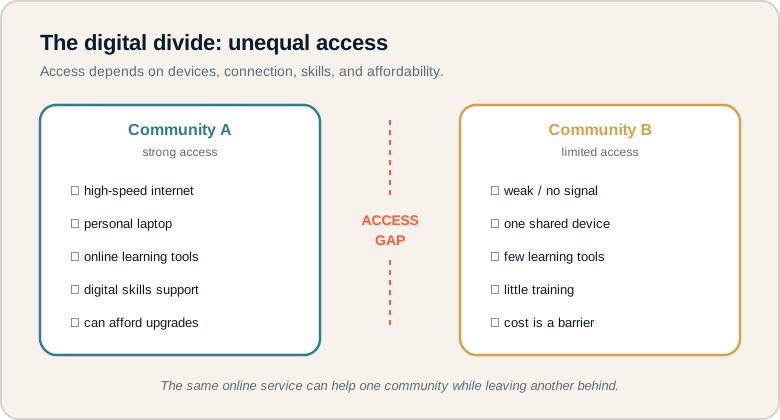
Two communities with very different access, separated by an access gap.
Compare the two communities: one has strong devices, connection, and skills, while the other faces weak signal, shared devices, and cost barriers. The gap between them is the digital divide. On the exam, identify who is excluded and which specific barrier causes it.
The dimensions of access.
Each is a different barrier to consider.
- Device access: having a usable computer or phone, not shared or outdated.
- Internet access: a reliable, fast enough connection.
- Digital literacy: the skills to use computing tools effectively.
- Affordability: being able to pay for devices and data.
- Accessibility: designs usable by people with disabilities.
- Infrastructure: the networks and systems that make access possible in an area.
Memory hook: Access is a chain: device, connection, skills, and cost. A weak link anywhere blocks the whole thing.
How the digital divide is tested.
Identifying barriers and who is excluded.
Be ready to:
- Explain that the divide involves more than internet speed.
- Identify who might be excluded by a computing innovation.
- Name specific barriers, such as cost, skills, or accessibility.
- Suggest how a design could reduce the divide.
Questions often describe a service moving online and ask who benefits, who is left out, and how to help.
Exam tip: When a scenario assumes everyone has equal access, point out the assumption and name a group that might be excluded.
Moving homework fully online.
Who benefits, who is excluded, and what helps.
A school moves all homework submission online. Let's analyze the impact through the digital divide.
- Who benefits: students with their own device, reliable internet, and strong digital skills can submit easily and even gain new tools.
- Who may be excluded: students who share one device with siblings, have weak or no home internet, cannot afford data, or lack the skills to navigate the system. Students with disabilities may struggle if the platform is not accessible.
- Solutions that reduce the divide: offer offline or paper alternatives, provide loaner devices, ensure the platform works on low bandwidth and older phones, build in accessibility features, and give training.
The lesson is that an online-only policy is not automatically fair. The same change helps some students while disadvantaging others, so a responsible school plans for the barriers and provides alternatives.
Digital divide misconceptions.
These oversimplify the problem.
- Thinking it is only about internet speed. Devices, skills, cost, and accessibility all matter.
- Ignoring device quality and affordability. An old or shared device is a real barrier.
- Ignoring skills and language. Access without the ability to use tools is not enough.
- Assuming everyone benefits equally. The same service can help some and exclude others.
- Forgetting accessibility needs. Designs must work for people with disabilities too.
Reframe: Ask "Who cannot use this, and why?" The answer reveals the real divide.
Access barriers at a glance.
Each dimension and its impact.
| Dimension | What it covers | Barrier example |
|---|---|---|
| Device access | Having a usable device | Sharing one phone |
| Internet access | Reliable connection | Weak rural signal |
| Digital literacy | Skills to use tools | Never taught the software |
| Affordability | Cost of access | Cannot pay for data |
| Accessibility | Usable with disabilities | No screen-reader support |
| Infrastructure | Networks in an area | No broadband nearby |
Always name a specific excluded group.
Vague answers lose points; specifics earn them.
When a question involves access, name a concrete group that could be left out and the exact barrier they face, such as "students without home internet" or "users who rely on a screen reader." Specific examples show genuine understanding and strengthen impact answers.
Try it: A city offers a phone-only app for booking clinic appointments. Name one group that could be excluded and a fix.
Practice — attempt these now.
AP-style assessments aligned to this lesson. Time them.
AP CSP Big Idea 5 Topic 3: Digital Divide — Set 1
AP-style topic practice assessment
AP CSP Big Idea 5 Topic 3: Digital Divide — Set 2
AP-style topic practice assessment
AP CSP Big Idea 5 Topic 3: Digital Divide — Set 3
AP-style topic practice assessment
AP CSP Big Idea 5 Topic 3: Digital Divide — Set 4
AP-style topic practice assessment