The Internet is a network of networks.
Clients, servers, and routers connect so data can travel almost anywhere.
The Internet is a massive network made of many smaller networks connected together. Devices called clients request information, servers provide it, and routers forward data between networks along the way. Every device has an IP address, and DNS translates human-friendly names into those addresses.
This topic is part of Big Idea 4: Computer Systems and Networks. You will learn how a request travels from your device to a server, and the difference between the Internet and the World Wide Web.
Why this matters: Understanding Internet architecture explains how a webpage loads, why the system scales to billions of devices, and why it has no single point of control.
A request hops across networks to reach a server.
DNS finds the address; routers forward the data.
When a client (your device) wants a webpage, it first needs the server's IP address, a numeric label that identifies a device on the network. Since people use names like www.example.com, DNS (the Domain Name System) acts like a phonebook, translating the name into the matching IP address.
The request then travels through a series of routers, which forward data between networks toward the destination. It may pass through your local router, your Internet service provider, and many more routers before reaching the server that holds the site. The server sends a response back along a path of routers.
This design is distributed and scalable: no single machine runs the Internet, and new networks and servers can be added without redesigning the whole system. Note that the Internet is the underlying network, while the World Wide Web is one service (websites and pages) that runs on top of it.
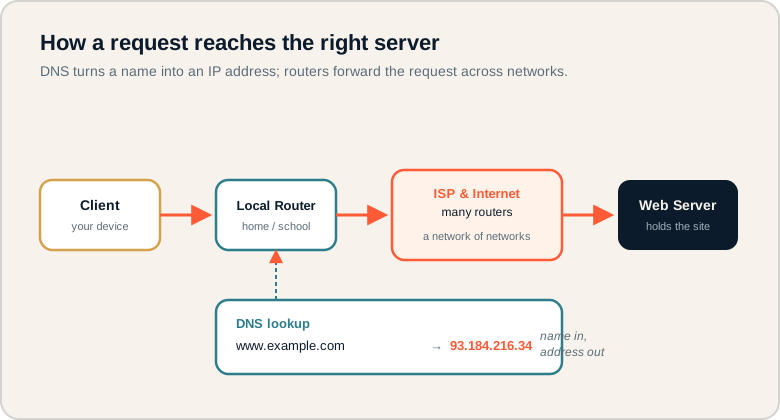
A client reaches a server through routers, with DNS turning a domain name into an IP address.
Follow the top row from client to local router to the Internet's many routers to the web server. The DNS lookup below shows a name becoming an IP address before the request is routed. On the exam, remember DNS resolves the name first, then routers forward the request.
The pieces of the Internet.
Know each role precisely.
- Internet: the global network of connected networks.
- World Wide Web: a service of linked pages that runs on the Internet.
- Client: a device that requests information.
- Server: a system that provides information or services.
- Router: a device that forwards data between networks.
- IP address: a numeric label identifying a device on a network.
- DNS: the system that translates domain names into IP addresses.
Memory hook: The Internet is the roads; the Web is one kind of traffic on them. DNS is the directory that finds the address.
How Internet architecture is tested.
Request paths, DNS, and the Internet vs Web distinction.
Be ready to:
- Trace how a request travels from client to server.
- Explain the role of DNS in resolving a name to an IP address.
- Distinguish the Internet from the World Wide Web.
- Describe why the design is scalable and distributed.
The exam values understanding that data can take different paths and that the system has no single point of control.
Exam tip: The Internet is the infrastructure; the Web is one service on it. Email and video calls also use the Internet but are not the Web.
Visiting www.example.com.
How the request finds the right server.
A student enters www.example.com in a browser. How does the request reach the correct server?
- DNS lookup: the browser asks DNS to translate www.example.com into an IP address, such as 93.184.216.34.
- Leaving the device: the request goes to the local router, then to the student's Internet service provider.
- Routing: routers across the Internet forward the request toward the server's IP address, choosing available paths along the way.
- Reaching the server: the request arrives at the web server that hosts example.com.
- Response: the server sends the page back through routers to the student's device, where the browser displays it.
The key insight: the name is resolved to an address first, then routers forward the data. No single fixed cable connects the student to the server; the request hops across many networks.
Internet misconceptions.
These confuse the structure of the network.
- Confusing the Internet with the Web. The Web is one service running on the Internet.
- Thinking data follows one fixed path. Routers can send data along different routes.
- Believing a server must be one machine. A server can be many machines working together.
- Ignoring DNS. Without DNS, names could not be turned into IP addresses.
- Thinking routers create content. Routers forward data; they do not produce it.
Reframe: Routers are like postal sorting centers: they forward your mail toward its address but never write the letter.
Internet components at a glance.
Role of each piece.
| Term | What it is | Role |
|---|---|---|
| Internet | Network of networks | Carries all traffic |
| World Wide Web | Service of linked pages | Runs on the Internet |
| Client | Requesting device | Asks for data |
| Server | Providing system | Sends data back |
| Router | Forwarding device | Moves data between networks |
| IP address | Numeric device label | Identifies destination |
| DNS | Name-to-address system | Resolves domain names |
Narrate the journey of a request.
Name to address, then hop by hop to the server.
Practice describing a web request as a story: the name is resolved by DNS, the request leaves through routers, hops across networks, reaches the server, and the response returns. Being able to narrate this clearly is exactly what AP CSP networking questions ask for.
Try it: Explain in three sentences how typing a website name leads to a page appearing, mentioning DNS, routers, and the server.
Practice — attempt these now.
AP-style assessments aligned to this lesson. Time them.
AP CSP Big Idea 4 Topic 4: Internet Architecture — Set 1
AP-style topic practice assessment
AP CSP Big Idea 4 Topic 4: Internet Architecture — Set 2
AP-style topic practice assessment
AP CSP Big Idea 4 Topic 4: Internet Architecture — Set 3
AP-style topic practice assessment