The operating system runs the whole show.
It shares the hardware among programs and gives you a way to use the machine.
An operating system (OS) is the system software that manages a computer's hardware and resources. It decides which program uses the CPU, tracks memory, organizes files, talks to devices, and provides the interface you interact with.
This topic is part of Big Idea 4: Computer Systems and Networks. You will learn the main jobs of an OS and why applications cannot work without it.
Why this matters: The OS is why you can run several programs at once, keep files organized, and have basic security through permissions.
One manager coordinating shared resources.
Apps ask the OS; the OS controls the hardware.
The OS acts as a central manager. It handles processes (running programs), giving each a share of the CPU so many can run seemingly at the same time. It performs memory management, keeping track of what each program is using. It maintains the file system so data is organized and findable.
The OS also manages input and output with devices, provides a user interface (graphical or text-based), and enforces permissions that control who can access what. Applications rely on all of these services rather than touching hardware themselves.
Because the OS coordinates everything, a single program cannot hog the whole machine or freely read another user's protected files. That coordination is what makes a modern, multitasking computer possible.
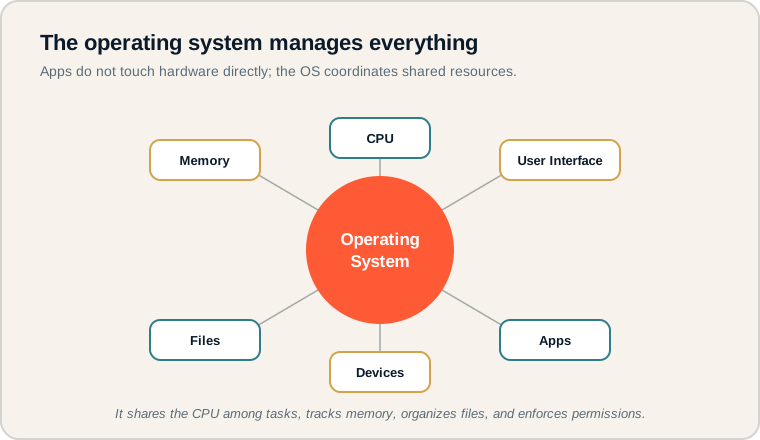
The OS at the center managing the CPU, memory, files, devices, apps, and user interface.
See the OS in the middle with each managed resource around it. Every connection shows a responsibility the OS coordinates. On the exam, remember the OS is not just the desktop you see; it is the manager controlling all of these at once.
The OS toolkit.
Each term is a core OS job.
- Operating system: system software that manages hardware and resources.
- Process: a program that is currently running.
- Memory management: tracking and allocating memory to programs.
- File system: the OS's way of organizing and storing files.
- User interface: how a person interacts with the computer.
- Permissions: rules controlling who can access or change resources.
Memory hook: Think of the OS as a building manager: it assigns rooms (memory), schedules elevators (CPU), files paperwork (files), and checks IDs (permissions).
How operating systems are tested.
Resource management and multitasking.
Be ready to:
- Explain how the OS manages CPU, memory, and files.
- Describe how multiple programs run at once.
- Recognize the OS role in security and permissions.
- Distinguish the OS from the applications running on it.
Questions often describe a multitasking scenario and ask what the OS is doing behind the scenes.
Exam tip: When a scenario has several programs running together, the OS is sharing the CPU and managing memory so each gets a turn.
Editing a document while music plays.
Two programs, one set of hardware.
A student edits a document while music plays in the background. How does the OS manage this?
- Processes: the editor and the music player are two processes. The OS rapidly shares the CPU between them, so both appear to run at the same time.
- Memory management: the OS gives each program its own memory space and tracks what each is using.
- Input and output: keystrokes go to the document, while audio is sent to the speakers, with the OS routing each correctly.
- File system: when the student saves, the OS writes the document to storage in the right place.
- Permissions: the OS ensures each program only accesses what it is allowed to.
The student experiences smooth multitasking, but it is the OS doing constant coordination underneath. Without it, the two programs would collide over the same hardware.
OS misconceptions.
These underestimate what the OS does.
- Thinking the OS is just the desktop screen. The interface is only one visible part of a much larger manager.
- Confusing apps with the OS. Apps run on top of the OS; they are not the same.
- Assuming only one program runs at a time. The OS shares the CPU so many run together.
- Forgetting the OS manages files. Saving and organizing files is an OS job.
- Ignoring security and permissions. The OS controls access to protect data.
Reframe: The desktop is the OS's front door. Most of its work happens out of sight, coordinating resources.
Operating system jobs at a glance.
What each responsibility means.
| Term | What it does | Example |
|---|---|---|
| Operating system | Manages the whole computer | Coordinates all resources |
| Process | A running program | Open music player |
| Memory management | Allocates and tracks memory | Space per program |
| File system | Organizes stored files | Folders and files |
| User interface | Lets a person interact | Desktop, menus |
| Permissions | Controls access | Who can open a file |
List the OS jobs behind any action.
It shows how much the OS coordinates.
When you do something on a computer, name the OS jobs involved: managing processes, memory, files, devices, the interface, and permissions. Practicing this makes multitasking scenarios easy to explain and reinforces why every application depends on the operating system.
Try it: You download a file while watching a video. Which OS jobs are working at the same time?
Practice — attempt these now.
AP-style assessments aligned to this lesson. Time them.
AP CSP Big Idea 4 Topic 3: Operating Systems — Set 1
AP-style topic practice assessment
AP CSP Big Idea 4 Topic 3: Operating Systems — Set 2
AP-style topic practice assessment
AP CSP Big Idea 4 Topic 3: Operating Systems — Set 3
AP-style topic practice assessment