Data travels in small pieces called packets.
A message is split up, routed separately, and rebuilt at the destination.
Packet switching is the method the Internet uses to move data. Instead of sending a whole file as one piece, the data is split into small packets. Each packet carries addressing information and travels independently through routers, and the packets are reassembled into the original message at the destination.
This topic is part of Big Idea 4: Computer Systems and Networks. You will learn why splitting data into packets makes the network more efficient and reliable.
Why this matters: Packet switching is why the Internet can share paths efficiently and route around problems instead of relying on one fixed connection.
Split, route independently, then reassemble.
Packets can take different paths and arrive out of order.
When you send data, it is divided into packets. Each packet includes a source address (where it came from), a destination address (where it is going), and a piece of the data, along with information about its order.
Routers forward each packet toward the destination, and different packets may follow different paths depending on what is fastest or available at that moment. Because of this, packets can arrive out of order. The receiving device uses the ordering information to reassemble them into the original message.
This is very different from sending one whole file along a single fixed route. Splitting into packets lets many users share the same network efficiently, and if one path is busy or broken, packets can use another. Packet switching reduces, but does not eliminate, delays.
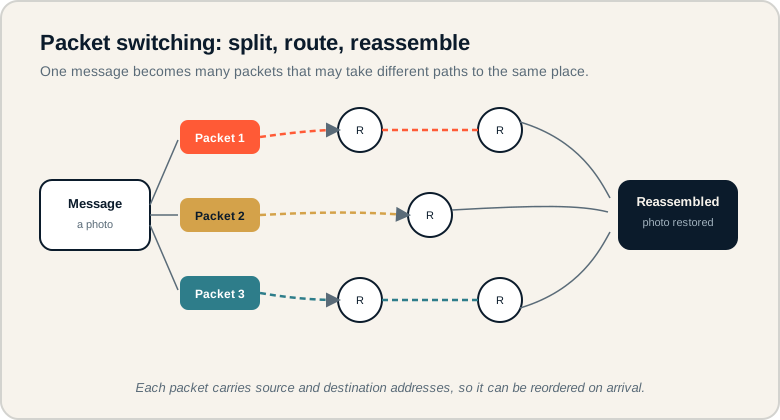
A message splits into packets that take different router paths and are reassembled at the destination.
Follow the message as it splits into three packets, each routed along its own path through different routers, then converging where they are reassembled. On the exam, remember packets are independent, may arrive out of order, and rely on addressing to be put back together.
The parts of packet switching.
Each term describes part of the journey.
- Packet: a small unit of data sent across a network.
- Router: a device that forwards packets toward their destination.
- Source address: where a packet came from.
- Destination address: where a packet is going.
- Reassembly: rebuilding the original message from received packets.
- Path: the route a packet takes through the network.
Memory hook: Think of a long letter torn into numbered pages, each mailed separately, then put back in order on arrival.
How packet switching is tested.
Independent paths and reassembly.
Be ready to:
- Explain how data is split, routed, and reassembled.
- Recognize that packets may take different paths and arrive out of order.
- Describe why packets need addressing information.
- Explain why packet switching improves efficiency and reliability.
The exam emphasizes that packets are independent and that ordering information lets the message be rebuilt correctly.
Exam tip: If a question says packets arrived out of order, that is normal. Ordering data in each packet lets the destination reassemble them correctly.
Sending a photo between phones.
Trace the image from split to reassembly.
A student sends a photo message from one phone to another. How is the image data handled?
- Split: the photo is divided into many packets, since it is too large to send efficiently as one piece.
- Address: each packet is labeled with the source and destination addresses and its position in the sequence.
- Route: routers forward the packets across the network. Different packets may take different paths depending on traffic.
- Arrive: packets may reach the destination out of order, since they traveled separately.
- Reassemble: the receiving phone uses the ordering information to rebuild the packets into the original photo.
The photo appears whole to the recipient, but it actually arrived as many independent pieces. This is why a brief network problem on one path does not necessarily ruin the whole transfer, as other packets can route around it.
Packet switching misconceptions.
These misjudge how packets travel.
- Thinking the whole message travels as one piece. It is split into many packets.
- Assuming all packets take the same path. Packets can travel different routes.
- Thinking routers read the message meaning. Routers forward packets using addresses, not content.
- Forgetting packets need addressing. Without addresses, packets could not be routed or reassembled.
- Assuming packet switching prevents all delays. It improves efficiency but delays can still occur.
Reframe: Each packet is a self-addressed piece. The network moves the pieces; the destination puts them back together.
Packet switching at a glance.
Each element and its role.
| Term | What it is | Role |
|---|---|---|
| Packet | Small unit of data | Carries part of the message |
| Router | Forwarding device | Sends packets onward |
| Source address | Origin label | Shows where it came from |
| Destination address | Target label | Shows where it goes |
| Reassembly | Rebuilding the message | Restores original data |
| Path | Route through the network | Can differ per packet |
Always mention addressing and reassembly.
They are the heart of packet switching answers.
When explaining packet switching, include that each packet carries addressing and ordering information and that the destination reassembles them. Naming these two ideas covers what graders look for and shows you understand why packets can travel independently yet still form a correct message.
Try it: Explain why a video can keep playing even if some packets briefly take a slower path than others.
Practice — attempt these now.
AP-style assessments aligned to this lesson. Time them.
AP CSP Big Idea 4 Topic 6: Packet Switching — Set 1
AP-style topic practice assessment
AP CSP Big Idea 4 Topic 6: Packet Switching — Set 2
AP-style topic practice assessment
AP CSP Big Idea 4 Topic 6: Packet Switching — Set 3
AP-style topic practice assessment