Parameters let one procedure work with different data.
Pass in a value, and the same procedure adapts to it.
A parameter is an input to a procedure. When you call the procedure, you supply an argument, the actual value, which the parameter receives. Parameters let a single procedure handle many different inputs instead of being locked to one fixed value.
This topic is part of Big Idea 3: Algorithms and Programming. You will learn how parameters generalize procedures and support abstraction.
Why this matters: The Create Performance Task rewards a procedure with a parameter. Parameters are what make your procedure flexible and reusable.
The argument flows into the parameter.
One procedure, many inputs.
In a definition like PROCEDURE greetUser(name), the word name is the parameter. It acts as a placeholder. When you call greetUser("Alex"), the argument "Alex" is passed in and stored in name for that run.
This is generalization: the same procedure works for any value you pass. Call it with "Sam" and it greets Sam; call it with "Maria" and it greets Maria. The body never changes, only the argument does.
A parameter is a special kind of variable that receives its value from the call. It is not a permanent store of every value ever passed; each call gives it a fresh value for that run.
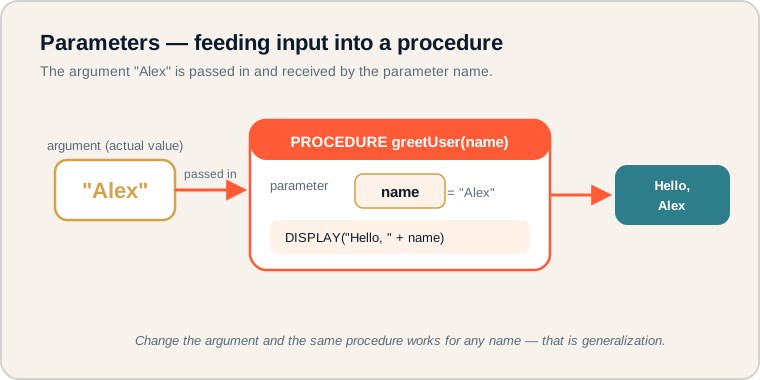
The argument "Alex" is passed into the parameter name, and the procedure displays a greeting.
Follow the flow: the argument on the left is passed into the parameter slot inside the procedure, which then uses it in the body to produce output. On the exam, match each argument in the call to the parameter in the definition, in order.
Parameter versus argument.
The most tested distinction here.
- Parameter: the named input placeholder in a procedure definition.
- Argument: the actual value passed in when the procedure is called.
- Procedure call: running a procedure and supplying arguments.
- Reusable procedure: one procedure that works with different inputs.
- Generalization: writing code that handles many cases, not just one.
- Abstraction: using a procedure by name and inputs, hiding its detail.
Memory hook: The parameter is the empty slot in the definition. The argument is the value you drop into that slot when you call.
How parameters are tested.
Matching arguments to parameters.
Be ready to:
- Identify the parameter in a definition and the argument in a call.
- Trace what a procedure outputs for a given argument.
- Explain how parameters make a procedure reusable.
- Recognize that different calls can pass different arguments.
Questions often show a procedure called several times with different arguments and ask for the combined output. Match each argument to the parameter and trace carefully.
Exam tip: The argument's value replaces the parameter throughout the body for that single call. Re-trace the body fresh for each call.
A reminder app with a parameter.
One procedure reminds about any task.
A reminder app uses a procedure with a parameter so it can remind about any task:
PROCEDURE remind(taskName)
{
    DISPLAY("Remember to complete " + taskName)
}

remind("math homework")
remind("science project")
The parameter is taskName. On the first call, the argument "math homework" is passed in, so the procedure displays "Remember to complete math homework". On the second call, the argument "science project" is passed in, so it displays "Remember to complete science project".
One procedure handles both reminders. That is the power of parameters: the body stays the same while the argument changes the result. Without a parameter, you would need a separate procedure for every task, which is exactly the repetition parameters help you avoid.
Parameter pitfalls.
These confuse inputs and reduce flexibility.
- Confusing parameter with argument. The parameter is the placeholder; the argument is the value passed in.
- Forgetting to pass an argument. A procedure that expects a value needs one in the call.
- Hard-coding values. Putting a fixed value in the body removes the flexibility a parameter provides.
- Too many unrelated parameters. Keep parameters focused and meaningful.
- Thinking parameters store all past values. Each call gives the parameter a fresh value.
Reframe: The parameter is a labeled slot. Each call fills the slot with that call's argument, then the body runs with it.
Parameter terms at a glance.
Inputs and generalization.
| Term | What it is | Example |
|---|---|---|
| Parameter | Input placeholder in the definition | taskName |
| Argument | Actual value passed in | "math homework" |
| Procedure call | Runs the procedure with arguments | remind("math homework") |
| Reusable procedure | Works with different inputs | remind for any task |
| Generalization | Handles many cases | One procedure, many tasks |
Replace a fixed value with a parameter.
It instantly makes a procedure reusable.
If a procedure has a hard-coded value, ask whether that value should become a parameter. Turning it into an input lets the same procedure serve many cases, which strengthens the abstraction and generalization graders look for on the Create Performance Task.
Try it: Rewrite a procedure that always greets "Alex" so it takes a name parameter and can greet anyone.
Practice — attempt these now.
AP-style assessments aligned to this lesson. Time them.