Return values let a procedure hand back a result.
RETURN sends a value to the caller, which can store and use it later.
A return value is the output a procedure sends back to the part of the program that called it. Using RETURN(value), a procedure can compute something and pass the result out, where it can be stored in a variable and used in the rest of the program.
This topic closes Big Idea 3: Algorithms and Programming. You will learn the difference between RETURN and DISPLAY, and how returned values help build larger algorithms.
Why this matters: Returning a computed value is what lets procedures work together as building blocks, a key idea for the Create Performance Task.
RETURN sends a value back; DISPLAY only shows it.
A returned value can be stored and reused; displayed text cannot.
There are two different things a procedure can do with a result. DISPLAY shows a value on the screen for the user to read. RETURN sends a value back to the caller so the program can keep working with it. They are not interchangeable.
When a procedure returns a value, you usually capture it with assignment: cartTotal ← addTax(100). The call runs the procedure, the procedure returns a number, and that number is stored in cartTotal. You can then display it, use it in more math, or pass it to another procedure.
Some procedures return a value (they compute a result), while others just perform an action like displaying a message and return nothing. Knowing which kind you have tells you whether there is a value to store.
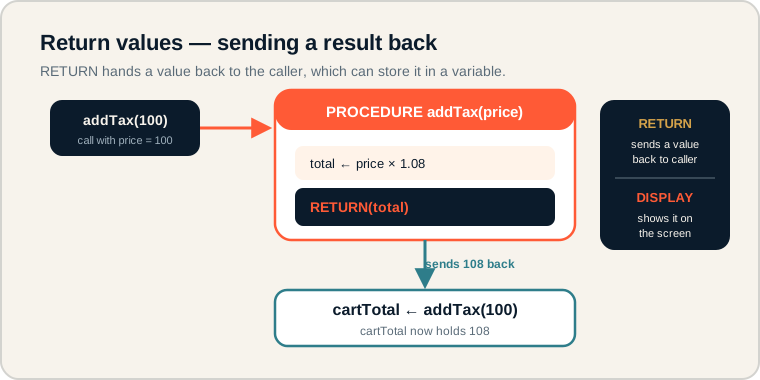
addTax(100) computes a total, returns it, and the caller stores the result in a variable.
Follow the path: the call passes in 100, the body computes the total, RETURN sends the result back, and the caller stores it with assignment. The side panel contrasts RETURN (sends a value to the caller) with DISPLAY (shows it on screen). On the exam, check whether a result is returned and stored, or only displayed.
The language of outputs.
Separate returning from displaying.
- RETURN: sends a value back to the caller and ends the procedure.
- DISPLAY: shows a value on screen but sends nothing back.
- Returned value: the result a procedure passes back.
- Procedure output: what a procedure produces, whether a value or an action.
- Assignment from a call: storing a returned value, like total ← addTax(100).
- Action procedure: a procedure that performs a task and returns nothing.
Memory hook: RETURN hands the value back to the program. DISPLAY just puts it on the screen for a human.
How return values are tested.
Tracing what gets returned and stored.
Be ready to:
- Trace the value a procedure returns for a given argument.
- Tell the difference between RETURN and DISPLAY in pseudocode.
- Follow a returned value into the variable that stores it.
- Recognize that not every procedure returns a value.
A common question shows a procedure with RETURN and asks for the final value of a variable that stored the call. Trace the body, find the returned value, then place it in the variable.
Exam tip: RETURN usually ends the procedure immediately. Any steps written after a RETURN that runs will not execute.
A shopping app that adds tax.
Compute the total, return it, then display it.
A shopping app applies an 8% tax. The procedure computes the total and returns it:
PROCEDURE addTax(price)
{
    total ← price * 1.08
    RETURN(total)
}

finalPrice ← addTax(100)
DISPLAY(finalPrice)
Trace it step by step. The call addTax(100) passes 100 into the parameter price. Inside the body, total ← price * 1.08 computes 100 × 1.08 = 108. Then RETURN(total) sends 108 back to the caller.
Because the call is on the right side of an assignment, the returned 108 is stored in finalPrice. The next line, DISPLAY(finalPrice), shows 108 on screen.
Notice the division of labor: RETURN moved the value back into the program so it could be stored, and DISPLAY then showed it to the user. If the procedure had only displayed the total instead of returning it, finalPrice would have nothing to store.
Return value pitfalls.
These break larger algorithms quietly.
- Confusing DISPLAY with RETURN. Displaying shows a value; returning sends it back to be used.
- Not storing the returned value. If you ignore the result, it is lost.
- Returning too early. A RETURN that runs before later steps skips them.
- Expecting every procedure to return something. Action procedures return nothing.
- Ignoring the returned value. A computed result is useful only if you use it.
Reframe: DISPLAY talks to the user. RETURN talks to the rest of your program.
Return and display compared.
Outputs that stay in the program versus outputs for the user.
| Term | What it does | Example |
|---|---|---|
| RETURN | Sends a value back to the caller | RETURN(total) |
| DISPLAY | Shows a value to the user | DISPLAY(finalPrice) |
| Returned value | The result passed back | 108 |
| Procedure output | What a procedure produces | A value or an action |
| Assignment from a call | Stores a returned value | finalPrice ← addTax(100) |
| Action procedure | Performs a task, returns nothing | showCorrectMessage() |
Ask whether you need the value later.
If yes, RETURN it; if you only need to show it, DISPLAY it.
When designing a procedure, decide whether the result will be used elsewhere in the program. If it will, use RETURN and store it; if it is only for the user to read, DISPLAY is enough. A procedure that returns a computed value is exactly the kind of reusable building block that strengthens a Create Performance Task.
Try it: Write a procedure double(n) that returns n * 2, then store double(6) in a variable and display it. What value appears?
Practice — attempt these now.
AP-style assessments aligned to this lesson. Time them.