Design is deciding what to build, and for whom.
A program without a clear purpose and a clear user is just code looking for a problem.
Program design is the stage between understanding a problem and writing code. Here you define the program's purpose, decide who the users are, and plan how the program will take input, process it, and produce useful output.
Good design happens on paper or a whiteboard first. Developers use storyboards, flowcharts, and pseudocode to think through behavior before committing to code. This planning is a core part of Big Idea 1: Creative Development.
Why this matters: The Create Performance Task asks you to describe your program's purpose and intended function. Designing with intent now gives you a clear story to tell later.
From a user need to working behavior.
Every well-designed program follows a flow from need to feedback.
Design starts with a user need and turns it into a program purpose. From there you map out how data moves through the program:
- Inputs: what the user or system provides.
- Processing: the logic that transforms input into something useful.
- Outputs: what the program shows or returns.
- Feedback: how the user responds, which guides future improvements.
Designers also break a program into features, then make each feature testable by defining what "working correctly" looks like. A feature you cannot test is a feature you cannot trust.
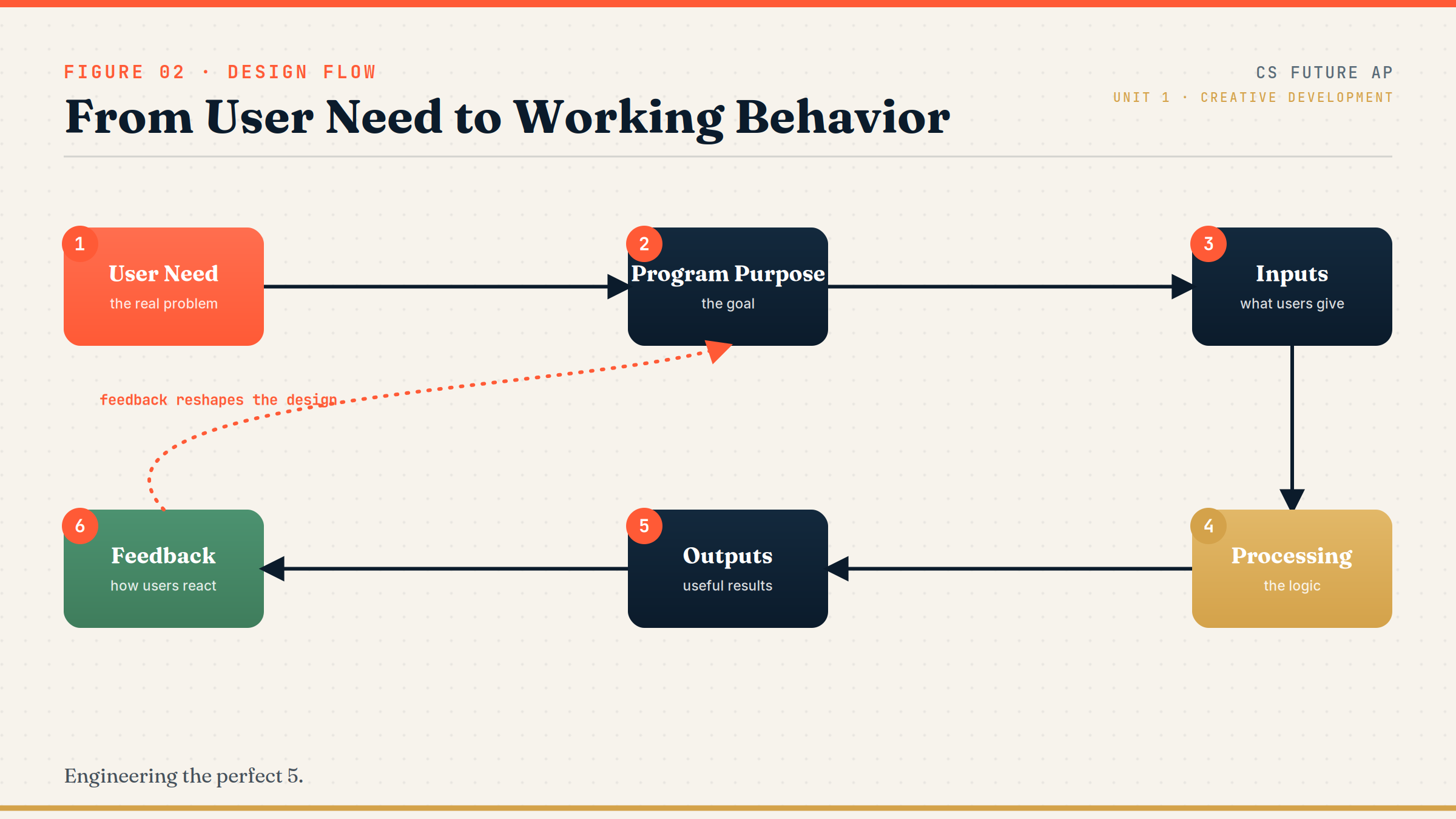
The design flow: User Need → Program Purpose → Inputs → Processing → Outputs → Feedback.
The chain begins with people, not code. Notice that Feedback loops back toward the purpose, which is why programs evolve. On the exam, strong design answers always trace a clear line from a user's need to the program's output, and treat feedback as part of the design, not an afterthought.
The language of planning.
These terms describe how developers represent a design.
- Program purpose: the central goal the program is built to achieve.
- User need: the real-world problem or desire driving the program.
- Storyboard: a sequence of sketches showing what the user sees screen by screen.
- Flowchart: a diagram of the program's logic and decision points.
- Pseudocode: a plain-language, code-like outline of behavior, independent of any one language.
- Prototype: an early, simplified working version used to test ideas.
Memory hook: A storyboard shows what users see, a flowchart shows how logic flows, and pseudocode shows what the code will do.
What the College Board tests about design.
Expect questions about users, purpose, and planning tools.
AP CSP design questions often ask you to:
- Match a program purpose to a described user need.
- Choose the right planning tool (storyboard vs. flowchart vs. pseudocode) for a situation.
- Identify inputs and outputs from a design description.
- Explain why early prototyping and user feedback improve a program.
The Create Performance Task explicitly rewards a clearly stated purpose and intended function, so practicing precise design statements directly raises your score.
Exam tip: When asked which design choice is best, favor the one that serves the target user, not the one that is most technically impressive.
Designing a simple study planner app.
From user need to a feature plan to a flow sketch.
User need: Students struggle to organize study time before exams.
Program purpose: Help a student see how many days remain until an exam and plan study sessions.
Before coding, we break the program into features and decide how each will be tested:
| Feature | Input | Output | Testable behavior |
|---|---|---|---|
| Add subject | Subject name | Confirmation | Subject appears in the list |
| Set exam date | Exam date | Days remaining | Correct count for known dates |
| Show plan | (none) | Study schedule | Schedule fits within days remaining |
Only after planning do we sketch high-level program flow in AP CSP pseudocode:
DISPLAY("Welcome to Study Planner")
subject ← INPUT()
examDate ← INPUT()
daysRemaining ← examDate - currentDate
DISPLAY(daysRemaining)
This outline shows the input, processing, and output for the core feature without locking us into any programming language yet.
Design errors that quietly sink projects.
Most failed programs failed at the design stage.
- Designing for yourself. Building what you like instead of what the target user needs.
- Too many features too early. Trying to do everything at once instead of nailing the core.
- Unclear input/output. If you cannot describe what goes in and what comes out, the design is not ready.
- No error handling plan. Forgetting to plan for bad or unexpected input.
- Ignoring accessibility and usability. A program nobody can comfortably use is a failed design.
Reframe: Ask "Who is this for, and can they actually use it?" before "What cool feature can I add?"
Choosing the right design tool.
Each tool answers a different design question.
| Tool | What it shows | Best used for |
|---|---|---|
| Storyboard | Screens the user sees, in order | Planning the user experience |
| Flowchart | Logic and decision paths | Mapping how the program behaves |
| Pseudocode | Step-by-step intended behavior | Outlining logic before coding |
| Prototype | An early working version | Testing ideas with real use |
| User feedback | How real users react | Guiding revisions and priorities |
Build a feature table before you code.
Turns vague ideas into a concrete, testable plan.
For any program idea, make a small table with three columns: Feature, Input/Output, and How I'll test it. This single habit clarifies your design, exposes missing pieces, and gives you exact wording for describing program function on the Create Performance Task.
Try it: Limit your first version to three features. You can always iterate later, which is exactly what professional developers do.
Practice — attempt these now.
AP-style assessments aligned to this lesson. Time them.
AP CSP Big Idea 1 Topic 2: Program Design — Set 1
AP-style topic practice assessment
AP CSP Big Idea 1 Topic 2: Program Design — Set 2
AP-style topic practice assessment
AP CSP Big Idea 1 Topic 2: Program Design — Set 3
AP-style topic practice assessment
AP CSP Big Idea 1 Topic 2: Program Design — Set 4
AP-style topic practice assessment