Abstraction lets us use complex things without drowning in detail.
You drive a car without understanding its engine. That is abstraction at work.
Abstraction is the practice of hiding unnecessary detail so you can focus on the bigger picture. It is one of the most important ideas in all of computer science and a central theme of Big Idea 1: Creative Development.
We use abstraction constantly: a name stands in for a complicated idea, a procedure bundles many steps into one command, and an interface lets us use a tool without knowing how it is built inside.
Why this matters: Abstraction is the key to managing complexity. Without it, large programs would be impossible to build or understand.
Hiding detail behind a simple name or interface.
Using something and knowing how it works are two different things.
The heart of abstraction is the gap between using a thing and understanding its internal workings. When you call a procedure named getWeatherReport, you care about the result, not the messy steps inside. Those steps are hidden, and that is a good thing.
Abstraction appears at many levels:
- Naming: a single name represents a complex idea or value.
- Procedures: many steps are bundled into one reusable command.
- Data: a list represents a whole collection without naming every element.
- Interfaces: a clean set of controls lets you use a system without internal knowledge.
- APIs: a defined way to use another program's features without seeing its code.
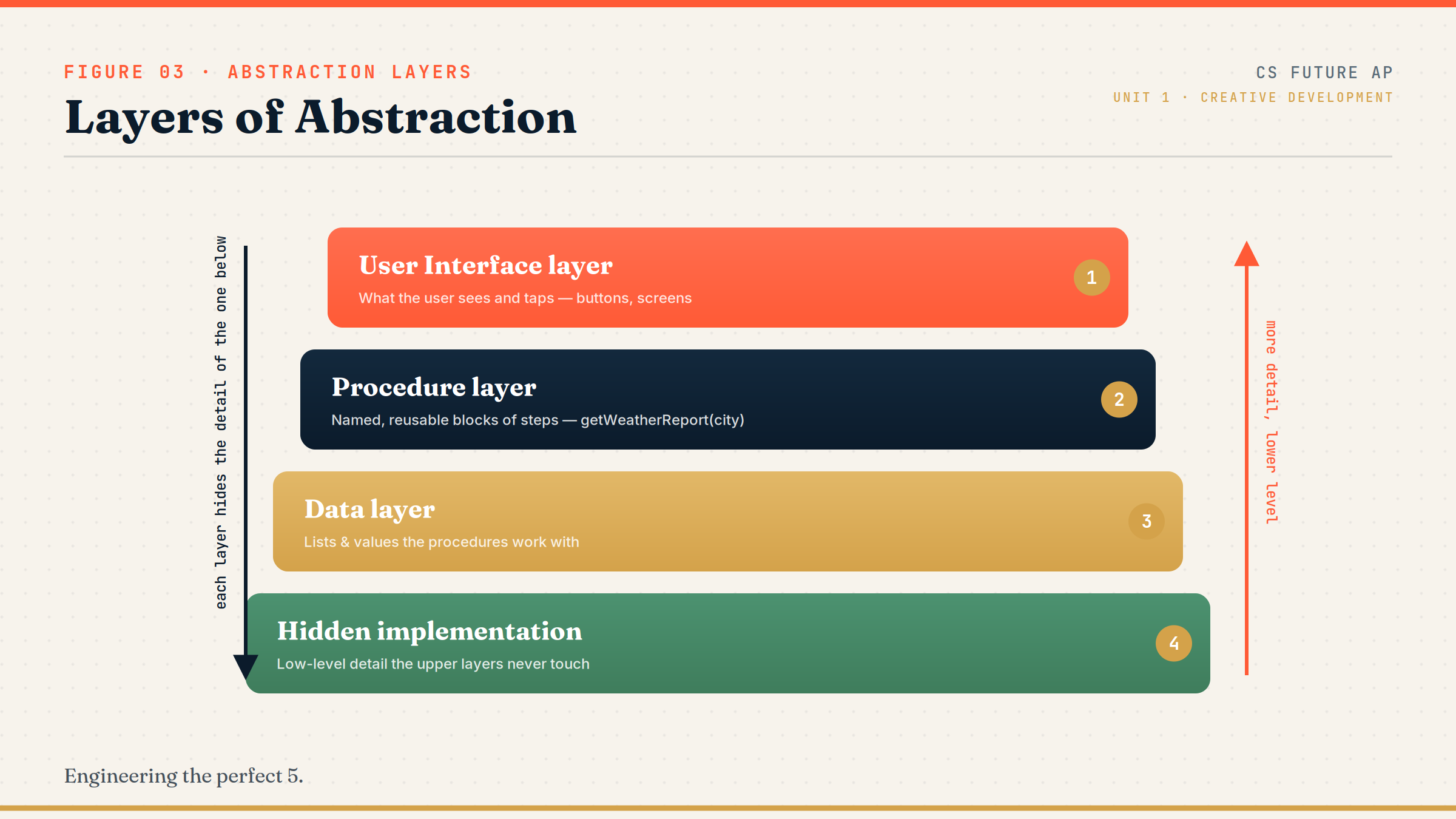
Layers of abstraction: User Interface → Procedure layer → Data layer → Hidden implementation details.
Read this from top to bottom. Each layer relies on the one below it but hides that layer's complexity from the one above. A user taps a button (top) without knowing about the procedures, data, or low-level details underneath. On the exam, recognize that higher layers depend on lower ones while being shielded from their detail.
Forms of abstraction to know.
AP loves to test the different ways detail gets hidden.
- Abstraction: hiding detail to reduce complexity and focus on what matters.
- Procedure (function/method): a named, reusable block of statements that performs a task.
- Parameter: an input value passed into a procedure to change its behavior.
- Data abstraction: using structures like lists so you do not handle every element individually.
- Interface: the set of controls through which you interact with a system.
- API (Application Programming Interface): a defined way for one program to use another's features.
Memory hook: A procedure is a "black box." You know what goes in and what comes out, but you do not need to see what happens inside.
How abstraction shows up on the exam.
Procedures and parameters are heavily tested all year.
Be prepared to:
- Explain how a procedure reduces complexity and supports reuse.
- Identify what a procedure's parameters and return value are.
- Recognize that a programmer can use a procedure or API without knowing its internal code.
- Describe how data abstraction (such as lists) simplifies managing many values.
On the Create Performance Task, you must include and explain a student-developed procedure with a parameter. Understanding abstraction now prepares you to write and justify that procedure later.
Exam tip: When a question highlights a named procedure, the "best" benefit answer is usually about managing complexity or enabling reuse, not speed.
A weather app procedure.
One name hides several complicated steps.
Imagine a weather app. Getting a forecast involves requesting data, choosing what is relevant, and formatting it. We can hide all of that behind one procedure:
PROCEDURE getWeatherReport(city)
{
    data ← request weather data for city
    summary ← format temperature, condition, and warning
    RETURN(summary)
}
Now any part of the program can simply write getWeatherReport("Pune") and receive a clean summary. The caller does not need to know how the data is requested or formatted. The parameter city makes the procedure reusable for any location.
This is abstraction doing exactly its job: the complex internal steps are hidden, and the rest of the program works with a simple, meaningful name. If the internal method of getting data ever changes, code that calls the procedure does not have to change at all.
Misunderstandings about abstraction.
These confusions are common and exam-relevant.
- Thinking abstraction deletes detail. It hides detail, it does not remove it. The detail still exists underneath.
- Unclear procedure names. A procedure called doStuff defeats the purpose; names should describe what the procedure does.
- Hiding too much without documentation. If others cannot tell how to use your abstraction, it becomes a barrier.
- Confusing abstraction with security. Hiding detail is not encryption; abstraction is about clarity, not protecting secrets.
- Not using abstraction to reduce repetition. Copying the same logic many times instead of writing one reusable procedure.
Reframe: Abstraction is a clean control panel over hidden machinery, not a way to erase or lock away the machinery itself.
Types of abstraction compared.
Same idea, different levels.
| Type | What it hides | Example |
|---|---|---|
| Procedure abstraction | The steps inside a task | getWeatherReport(city) |
| Data abstraction | Individual elements of a collection | A list of all saved cities |
| User interface abstraction | The system behind the controls | A "Refresh" button |
| API abstraction | Another program's internal code | A weather data service |
Hunt for repeated logic and name it.
The fastest way to practice writing useful procedures.
When you notice the same steps appearing more than once in a plan or program, that is a signal to create a procedure. Give it a clear, descriptive name and a parameter so it works in more than one situation. This is exactly the skill the Create Performance Task rewards when it asks for a student-developed procedure.
Try it: Take any repeated action from your study planner design and rewrite it as a named procedure with one parameter.
Practice — attempt these now.
AP-style assessments aligned to this lesson. Time them.
AP CSP Big Idea 1 Topic 3: Abstraction — Set 1
AP-style topic practice assessment
AP CSP Big Idea 1 Topic 3: Abstraction — Set 2
AP-style topic practice assessment
AP CSP Big Idea 1 Topic 3: Abstraction — Set 3
AP-style topic practice assessment
AP CSP Big Idea 1 Topic 3: Abstraction — Set 4
AP-style topic practice assessment
AP CSP Big Idea 1 Topic 3: Abstraction — Set 5
AP-style topic practice assessment