Working code is not the same as correct code.
A program can run perfectly and still give the wrong answer. Testing is how you catch that.
Testing is checking whether a program produces the expected output. Debugging is finding and fixing the cause when it does not. These are two different activities, and skilled developers do both deliberately rather than by luck.
This topic, part of Big Idea 1: Creative Development, teaches you to design test cases, compare expected versus actual output, and reason carefully about errors, especially the sneaky ones hiding at boundaries.
Why this matters: The Create Performance Task asks you to describe how you tested your program. Good testing habits give you a clear, credible story to tell.
Test, compare, locate, fix, retest.
Debugging is a cycle, not a single lucky guess.
The testing and debugging cycle works like this: you write a test case (an input plus its expected output), run the program, and compare expected versus actual results. If they differ, you locate the error, fix it, and retest, including retesting things that worked before.
Errors generally fall into three families:
- Syntax errors: the code breaks the rules of the language, so it will not run.
- Runtime errors: the program crashes while running (for example, dividing by zero).
- Logic errors: the program runs fine but produces the wrong result. These are the hardest to find.
Edge cases and boundary values deserve special attention. Many bugs only appear at the exact limits of valid input. A trace table, which tracks variable values step by step, is a powerful tool for locating logic errors.
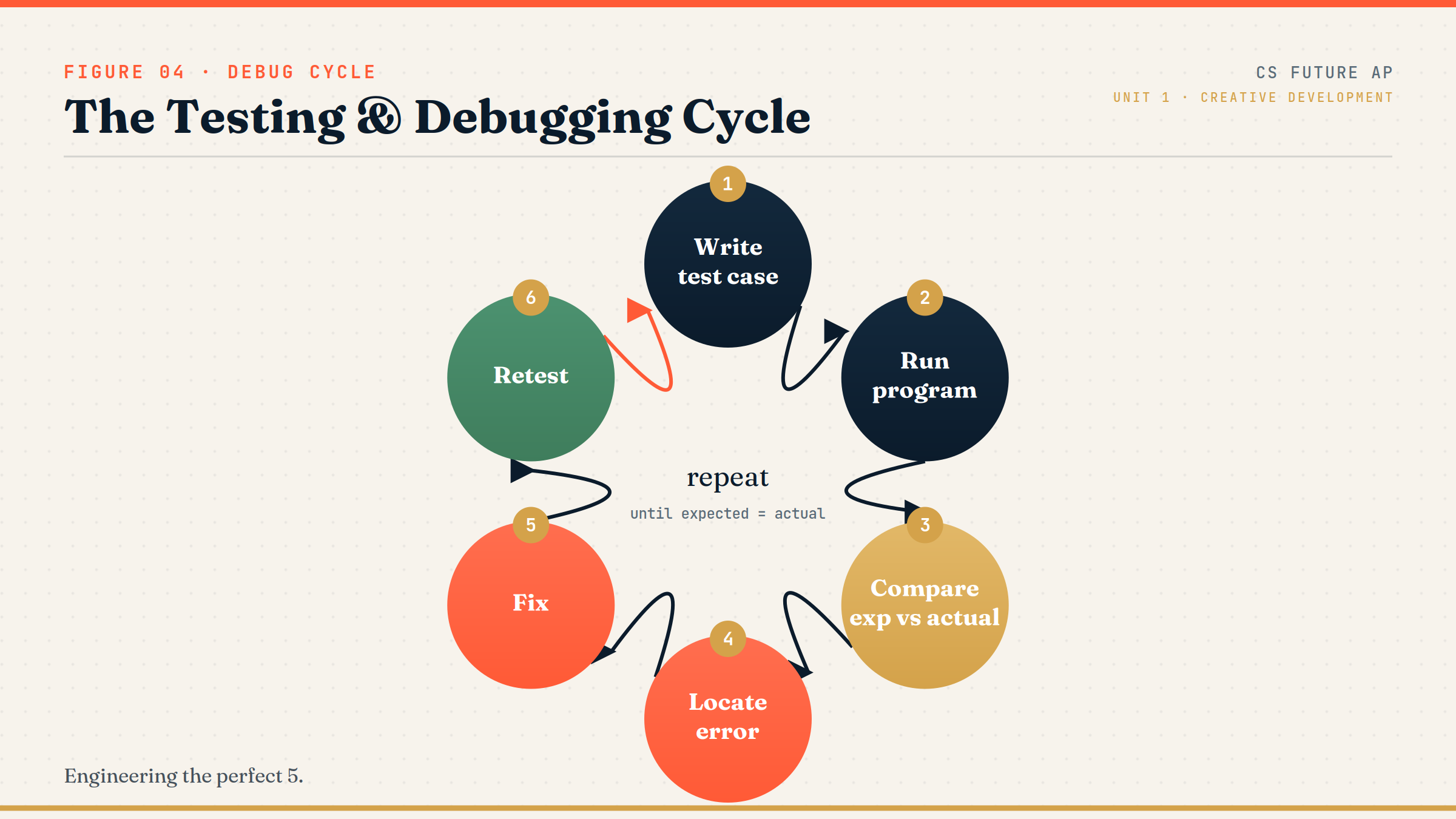
The cycle: Write test case → Run program → Compare expected vs actual → Locate error → Fix → Retest.
Notice that the arrow returns to the start. After a fix, you test again, because fixing one bug can reveal or even create another. On the exam, correct answers treat debugging as this repeating cycle rather than a one-time event, and they emphasize comparing expected with actual output.
Precise terms for precise thinking.
Mixing up these terms is a common exam slip.
- Test case: a specific input paired with the output you expect.
- Expected output: what a correct program should produce for a given input.
- Actual output: what the program really produces when you run it.
- Edge case: an input at the extreme or unusual end of what is allowed.
- Boundary value: an input exactly at a decision threshold (like a cutoff score).
- Trace table: a chart tracking how variables change as the program runs, step by step.
Memory hook: Testing asks "Is it right?" Debugging asks "Why is it wrong, and where?"
What the exam expects you to do.
Reading code carefully and predicting output is essential.
Be ready to:
- Classify an error as syntax, runtime, or logic.
- Trace a code segment and predict its output for a given input.
- Choose a test case that would expose a specific bug, often a boundary value.
- Explain why testing only "normal" inputs is insufficient.
The Create Performance Task requires describing the testing you did. Identifying boundary cases is one of the most reliable ways to write convincing, specific test descriptions.
Exam tip: When a question asks which test reveals a bug, the answer is frequently the input exactly at a comparison threshold (like the value equal to a cutoff).
A grade calculator with a boundary bug.
Same code, wrong answer at the edge.
Consider this grade logic, which is supposed to assign letter grades:
IF(score > 90)
{
    grade ← "A"
}
ELSE
{
    IF(score > 80)
    {
        grade ← "B"
    }
    ELSE
    {
        grade ← "C"
    }
}
Now test the boundary. The requirement says a score of 90 should earn an "A." But the condition uses score > 90, which is false when the score is exactly 90. So the program falls through and assigns "B" instead.
A test using a "normal" score like 95 would pass and hide the bug. Only the boundary value of exactly 90 exposes it. The fix depends on the requirement: if 90 should be an "A," the condition should be score ≥ 90.
Key takeaway: Whether 90 belongs in "A" or "B" depends entirely on the stated requirement. Always test the value at the boundary, not just safely above or below it.
Habits that let bugs survive.
Most undiscovered bugs survive because of weak testing habits.
- Only testing normal inputs. Skipping edge and boundary cases lets serious bugs slip through.
- Assuming "it runs" means "it's correct." A program can run flawlessly and still be wrong.
- Changing many things at once. If you alter five things and the bug disappears, you do not know which fix worked.
- Not recording expected output. Without knowing what to expect, you cannot tell if a result is wrong.
- Ignoring boundary cases. The exact threshold values are where logic errors love to hide.
Reframe: Change one thing at a time, write down what you expect, and always test the edges.
Errors and testing terms at a glance.
Keep these distinctions sharp.
| Term | What it is | Example |
|---|---|---|
| Syntax error | Breaks the language's rules; won't run | Missing a required keyword |
| Runtime error | Crashes while running | Dividing by zero |
| Logic error | Runs but gives wrong output | Wrong grade at score 90 |
| Test case | Input plus expected output | Input 90 → expect "A" |
| Edge case | Unusual or extreme input | An empty or negative value |
| Debugging | Finding and fixing the cause of an error | Tracing variables to a bad condition |
For every condition, test right at the line.
A simple rule that catches the majority of logic errors.
Whenever your program compares a value (greater than, less than, equal to a cutoff), write three test cases: one clearly below, one clearly above, and one exactly at the boundary. The boundary test is the one that most often reveals hidden logic errors, and describing it shows strong testing practice on the Create Performance Task.
Try it: For the grade calculator, write out expected outputs for scores of 79, 80, 81, 89, 90, and 91 before running anything.
Practice — attempt these now.
AP-style assessments aligned to this lesson. Time them.
AP CSP Big Idea 1 Topic 4: Testing & Debugging — Set 1
AP-style topic practice assessment
AP CSP Big Idea 1 Topic 4: Testing & Debugging — Set 2
AP-style topic practice assessment
AP CSP Big Idea 1 Topic 4: Testing & Debugging — Set 3
AP-style topic practice assessment
AP CSP Big Idea 1 Topic 4: Testing & Debugging — Set 4
AP-style topic practice assessment
AP CSP Big Idea 1 Topic 4: Testing & Debugging — Set 5
AP-style topic practice assessment