Programs remember things using variables.
A variable is a named place in memory that holds a value the program can use and change.
A variable is a named storage location. You give it a name, store a value inside, and the program can read or update that value later. Variables are how a program "remembers" information while it runs, such as a score, a name, or whether a game is over.
This topic opens Big Idea 3: Algorithms and Programming. You will learn the difference between a variable's name and its value, and that the value can change over time.
Why this matters: Almost every program tracks information with variables. On the Create Performance Task, clear variables make your code easier to write and explain.
The name stays; the value can change.
Think of a variable as a labeled box in memory.
Picture a variable as a box with a label. The label is the variable name, which the program uses to find the box. The contents are the value stored right now. The label never changes during a run, but the contents can be replaced at any time.
Variables can hold different data types: a number like 17, a string like "Alex", a Boolean like false, or a reference to a list. Choosing a clear name and the right type makes a program readable and correct.
In AP CSP pseudocode, you place a value in a variable with the assignment arrow, written as ←. Programs may also show variables in block-based code, but the idea is the same: a named box holding a value.
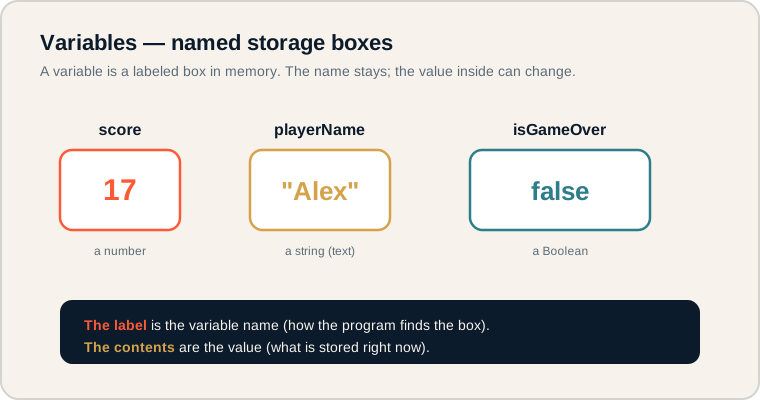
Three variables shown as labeled boxes holding a number, a string, and a Boolean.
Read each box as "name → value." The label above is how the program refers to the box; the value inside is what it currently holds. On the exam, keep the name and the value separate in your mind: changing the value does not change the name.
The words behind storage.
Get these exact before moving on.
- Variable: a named location in memory that stores a value.
- Value: the data currently stored in a variable.
- Assignment: placing a value into a variable using ←.
- Expression: a piece of code that produces a value, like 3 + 4.
- Data type: the kind of value stored, such as number, string, or Boolean.
- Variable name: the label used to refer to a variable.
Memory hook: Name is the label on the box. Value is what is inside the box right now.
What the exam tests about variables.
Mostly tracing values and reading pseudocode.
AP CSP questions on variables commonly ask you to:
- Trace what value a variable holds after several statements.
- Recognize that a variable's value can change during a program.
- Identify the data type a variable is storing.
- Tell the difference between displaying a variable and changing it.
You will read AP CSP pseudocode often, so practice following variables line by line and writing down their current values.
Exam tip: When tracing, keep a small table of each variable and update it on every line. Do not trust your memory across many steps.
Tracking score and player name.
A small game stores two pieces of information.
A game needs to remember the current score and the player's name. Here is the AP CSP pseudocode:
score ← 0
playerName ← INPUT()
DISPLAY(playerName)
DISPLAY(score)
Step by step:
- score ← 0 stores the number 0 in the variable score.
- playerName ← INPUT() stores whatever the user types (a string) in playerName.
- DISPLAY(playerName) shows the name on screen but does not change it.
- DISPLAY(score) shows 0, the current value of score.
Notice that DISPLAY only reveals a value; it never alters what the variable stores. The variable score still holds 0 after being displayed.
Where variables trip students up.
A few habits cause most variable errors.
- Confusing name with value. The name score is not the number it holds.
- Thinking variables cannot change. A variable's value can be updated many times.
- Using unclear names. Names like x or thing make code hard to follow.
- Treating strings and numbers the same. "5" is text; 5 is a number for math.
- Assuming DISPLAY changes the variable. Displaying a value only shows it; the variable is unchanged.
Reframe: A variable is a box you can refill. The label stays put while the contents change.
Variable terms at a glance.
Keep these distinctions sharp.
| Term | What it is | Example |
|---|---|---|
| Variable | Named storage location | score |
| Value | What is stored now | 17 |
| Assignment | Storing a value with ← | score ← 17 |
| Expression | Code that produces a value | score + 5 |
| Data type | Kind of value stored | number, string |
Name variables after what they hold.
Good names make tracing and grading easier.
Choose descriptive names like totalScore or userAge instead of a or temp. Clear names help you trace pseudocode on the exam and make your Create Performance Task code easy for a reader to understand and for you to explain.
Try it: Rename the variables in a small program from single letters to meaningful names. Notice how much clearer the logic becomes.
Practice — attempt these now.
AP-style assessments aligned to this lesson. Time them.