Everything a computer stores is built from just two digits.
Numbers, text, images, and sound all come down to patterns of 0s and 1s.
At the lowest level, computers do not understand decimal numbers, letters, or colors. They store everything using bits, where each bit is either 0 or 1. This two-state system is called binary, or base 2.
This topic opens Big Idea 2: Data. You will learn how computers represent numbers in binary, how place values work in base 2, and why the number of bits limits how many values can be stored.
Why this matters: Understanding binary explains why files have size limits, why colors use specific number ranges, and why "more bits" means "more possibilities" across all of computing.
Binary uses place values, just like decimal.
In base 10 each column is ten times bigger. In base 2 each column is twice as big.
In our everyday decimal system (base 10), each place is worth ten times the place to its right: ones, tens, hundreds, and so on. Binary works the same way, except each place is worth twice the one to its right.
Reading from right to left, the binary place values are: 1, 2, 4, 8, 16, 32, 64, 128, and so on. A group of 8 bits is called a byte, and it can represent any value from 0 to 255.
To find a binary number's decimal value, you add up the place values wherever there is a 1. A bit of 0 contributes nothing. Because each bit has only two possible states, adding more bits doubles the number of values you can represent.
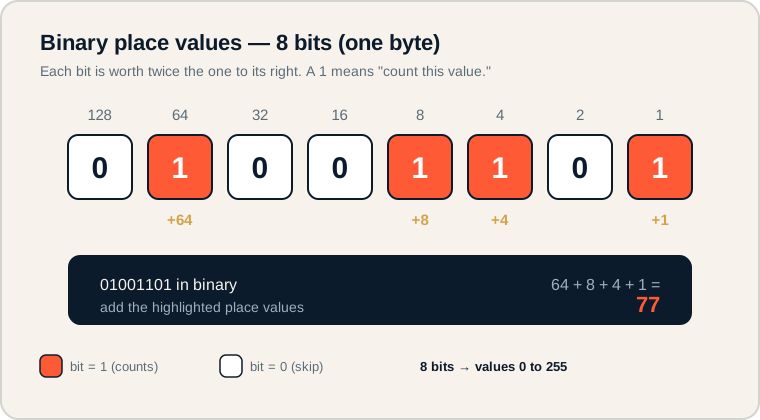
The 8-bit number 01001101 with its highlighted place values adding to 77.
Read the bits left to right, but match each one to its place value below. Wherever a bit is 1 (shown in coral), add that column's value. Here 64 + 8 + 4 + 1 gives 77. On the exam, always line up bits with their place values before adding.
The building blocks of representation.
Get these exact before moving on.
- Bit: the smallest unit of data; a single 0 or 1.
- Byte: a group of 8 bits.
- Binary: the base-2 number system using only 0 and 1.
- Decimal: the base-10 number system humans use daily.
- Place value: the value of a position in a number; in binary these double each step left.
- Overflow: what happens when a number is too large for the available bits to store.
Memory hook: A bit is one switch (on or off). A byte is eight switches working together.
What the College Board tests about binary.
Expect conversions and reasoning about limits.
AP CSP binary questions commonly ask you to:
- Convert a small binary number to decimal (and sometimes the reverse).
- Reason that n bits can represent 2 to the n different values.
- Explain why a fixed number of bits creates a limit, leading to overflow.
- Recognize that all data types, not just numbers, are ultimately stored in binary.
You do not need to memorize huge conversions. You need to apply place values carefully and explain why more bits allow more possible values.
Exam tip: If a question asks how many values some bits can store, think in powers of two: 1 bit gives 2 values, 2 bits give 4, 3 bits give 8, and so on.
Convert 01001101 to decimal.
Add the place values under every 1.
Write the 8 place values above the bits, then add only the columns that contain a 1:
place:  128  64  32  16   8   4   2   1
bit:      0   1   0   0   1   1   0   1

add the 1s:  64 + 8 + 4 + 1  =  77
The bits at the 64, 8, 4, and 1 positions are all 1, so we add those values. The bits at 128, 32, 16, and 2 are 0, so they contribute nothing. The result is 77.
This same method scales to any number of bits: list the place values, then sum the ones that are switched on.
Where binary trips students up.
Most binary errors come from a few predictable habits.
- Reading binary like decimal. 10 in binary is 2, not ten.
- Starting place values from the wrong side. The 1s place is always on the far right.
- Forgetting each bit has only two states. A bit can be 0 or 1, never 2 or higher.
- Assuming computers store only numbers. Text, images, and audio are all stored in binary too.
- Confusing bit and byte. A byte is 8 bits; the words are not interchangeable.
Reframe: Binary is not a secret code. It is ordinary counting with only two symbols and doubling place values.
Binary terms at a glance.
Keep these distinctions sharp.
| Term | What it is | Example |
|---|---|---|
| Bit | A single binary digit | 0 or 1 |
| Byte | A group of 8 bits | 01001101 |
| Binary | Base-2 number system | 1011 = 11 |
| Decimal | Base-10 number system | 11 |
| Place value | Worth of each position; doubles in binary | 1, 2, 4, 8, 16... |
| Overflow | Value too big for the available bits | 256 in only 8 bits |
Memorize the first eight place values.
It turns every conversion into simple addition.
Drill the sequence 1, 2, 4, 8, 16, 32, 64, 128 until it is automatic. Once those place values are instant, converting any byte to decimal is just picking out the 1s and adding. This saves real time on the multiple-choice section.
Try it: Convert 11110000 and 00001111 to decimal. Notice they split the byte's value (240 and 15) and together make 255.
Practice — attempt these now.
AP-style assessments aligned to this lesson. Time them.
AP CSP Big Idea 2 Topic 1: Binary Representation — Set 1
AP-style topic practice assessment
AP CSP Big Idea 2 Topic 1: Binary Representation — Set 2
AP-style topic practice assessment
AP CSP Big Idea 2 Topic 1: Binary Representation — Set 3
AP-style topic practice assessment
AP CSP Big Idea 2 Topic 1: Binary Representation — Set 4
AP-style topic practice assessment