Hardware is the physical machinery of computing.
Input, processing, storage, and output devices work together to run every program.
Hardware is the collection of physical components that make up a computing device. The processor does the work, memory holds what is in use right now, storage keeps files for later, and input and output devices connect the machine to people and the world.
This topic opens Big Idea 4: Computer Systems and Networks. You will learn what each component does and, importantly, the difference between memory and storage.
Why this matters: Understanding hardware explains why programs need memory to run, why files survive a restart, and how devices process input into output.
Input becomes output through processing.
The CPU works with memory, while storage keeps things permanently.
The CPU (central processing unit) is the processor that carries out instructions. While it works, it uses RAM (memory) to hold the data and programs in active use. Memory is fast but temporary: its contents are lost when power is off.
Storage, such as a hard drive or solid-state drive, keeps files permanently, even after shutting down. This is the key contrast: memory is the desk you work on right now, while storage is the filing cabinet that keeps things long term.
Input devices like a keyboard or mouse send data in, output devices like a screen or speaker present results, and a network interface connects the device to other networks and the Internet.
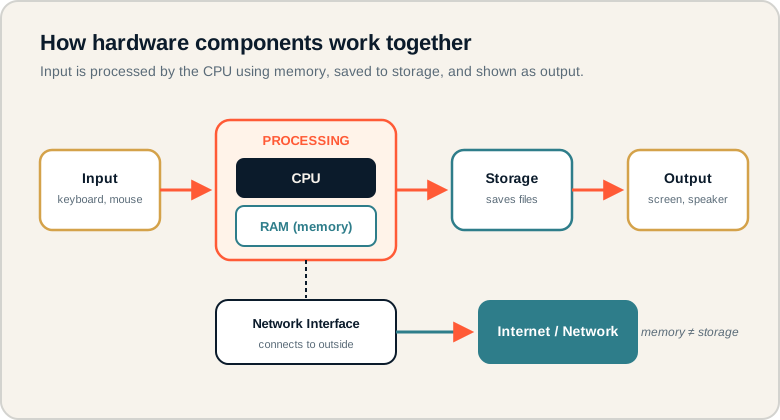
Input flows to the CPU and memory, results save to storage, and output is shown; a network interface links outward.
Follow the arrows left to right: input enters, the CPU processes it using memory, storage holds files, and output is produced. The network interface branches off to the Internet. On the exam, keep memory (temporary, in use now) separate from storage (permanent files).
The parts of a computing device.
Know what each component does.
- CPU: the processor that carries out instructions.
- RAM (memory): fast, temporary storage for data in active use.
- Storage: permanent space that keeps files after power off.
- Input device: hardware that sends data into the computer.
- Output device: hardware that presents results to the user.
- Network interface: hardware that connects the device to a network.
Memory hook: Memory is your desk (clears when you leave). Storage is the filing cabinet (keeps things).
What the exam tests about hardware.
Roles of components and the memory/storage split.
AP CSP hardware questions commonly ask you to:
- Identify the role of a component in a described task.
- Explain the difference between memory and storage.
- Trace how input is processed into output.
- Recognize that hardware and software are distinct but work together.
You will not need deep technical specs. Focus on what each component does and how they cooperate.
Exam tip: If a question mentions data that disappears when the power is cut, that is memory. If it survives a restart, that is storage.
Typing a search on a laptop.
Trace the hardware from keypress to screen.
A student types a search query into a laptop. Which hardware components are involved, from input to output?
- Keyboard (input device): sends the typed characters into the computer.
- CPU (processor): processes the keystrokes and runs the browser's instructions.
- RAM (memory): temporarily holds the browser and the query while they are in use.
- Network interface: sends the search request out to the Internet and receives the results.
- Storage: may hold the browser program and cached files that load the page faster.
- Screen (output device): displays the search results to the student.
The flow is input → processing with memory → network exchange → output. Each component has a distinct job, and the result the student sees depends on all of them working together.
Where hardware questions trip students.
Most errors come from blurring component roles.
- Confusing memory and storage. Memory is temporary and in use now; storage is permanent.
- Thinking the CPU stores files permanently. The CPU processes; storage keeps files.
- Ignoring input and output devices. They are essential parts of the system.
- Treating hardware and software as the same. Hardware is physical; software is instructions.
- Assuming faster hardware fixes everything. Good software design still matters.
Reframe: Hardware is the body; software is the set of instructions telling it what to do.
Hardware components at a glance.
Role and example for each.
| Component | Role | Example |
|---|---|---|
| CPU | Carries out instructions | Processor chip |
| RAM / memory | Temporary working data | Open programs |
| Storage | Permanent files | SSD, hard drive |
| Input device | Sends data in | Keyboard, mouse |
| Output device | Presents results | Screen, speaker |
| Network interface | Connects to networks | Wi-Fi adapter |
Map any task to the four stages.
Input, processing, storage, output.
For any everyday computing task, label the input, the processing, what gets stored, and the output. This quick habit makes hardware questions straightforward and reinforces how components cooperate, which also helps you describe the system your Create Performance Task program runs on.
Try it: Take a photo on a phone and save it. Which component is the input, which processes, which stores, and which shows the result?
Practice — attempt these now.
AP-style assessments aligned to this lesson. Time them.
AP CSP Big Idea 4 Topic 1: Hardware Components — Set 1
AP-style topic practice assessment
AP CSP Big Idea 4 Topic 1: Hardware Components — Set 2
AP-style topic practice assessment
AP CSP Big Idea 4 Topic 1: Hardware Components — Set 3
AP-style topic practice assessment