Software is the set of instructions that drives hardware.
From the apps you click to the drivers you never see, software comes in layers.
Software is a set of instructions that tells hardware what to do. It ranges from the application software you interact with directly, to the system software that runs underneath, to the device drivers that let the system talk to specific hardware.
This topic is part of Big Idea 4: Computer Systems and Networks. You will learn the layers of software and how each depends on the one below it.
Why this matters: Knowing the software layers explains why apps need an operating system, why drivers matter, and why updates are about more than appearance.
Each layer talks to the one beneath it.
Applications rely on system software, which controls the hardware.
Application software performs tasks for the user: a browser, a document editor, a game. It does not control hardware directly. Instead, it asks the system software, mainly the operating system, to do that.
System software manages the machine and provides services that applications use. Device drivers are specialized system software that let the operating system communicate with particular hardware, like a printer or graphics card. Firmware is low-level software stored on a device that helps it start up and operate.
This layering is why an app can run on many different computers: it talks to the system software, and the system software handles the specific hardware underneath. Software updates can fix bugs, close security holes, and add features, so they matter well beyond looks.
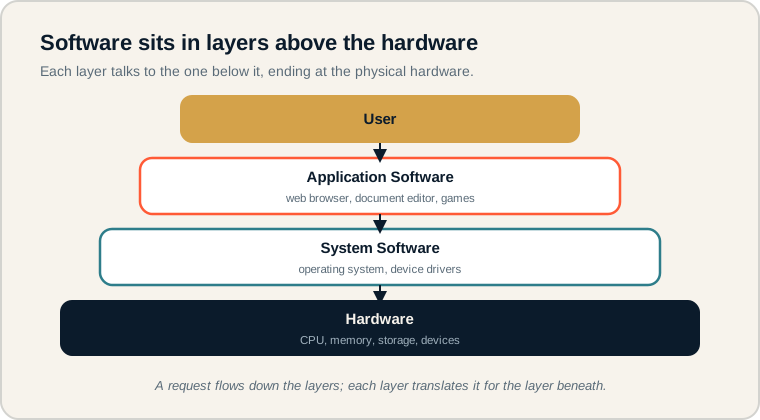
From user to application software to system software down to the hardware.
Read top to bottom. The user works with application software, which relies on system software, which controls the hardware at the base. Each layer translates a request for the layer below. On the exam, place any example, like a browser or a driver, on the correct layer.
Kinds of software.
Sort programs by what they do.
- Application software: programs that perform tasks for the user.
- System software: software that manages the computer and supports applications.
- Utility software: tools that maintain or optimize the system, like antivirus or backup.
- Device driver: system software that lets the OS communicate with specific hardware.
- Firmware: low-level software built into a device to help it operate.
- Hardware: the physical components the software controls.
Memory hook: Application = for the user. System = for the machine. Drivers = translators for specific hardware.
How software systems are tested.
Classifying software and the hardware relationship.
Be ready to:
- Classify a program as application or system software.
- Explain that software is instructions, not physical parts.
- Describe how applications depend on system software.
- Recognize why updates matter for security and functionality.
The exam focuses on the roles and relationships, not on naming specific products.
Exam tip: If a program performs a task for the user, it is application software. If it manages the computer itself, it is system software.
Opening a browser to load a webpage.
Identify each layer in action.
A student opens a web browser and loads a webpage. Which parts are application software, system software, and hardware?
- Application software: the web browser itself, which the student uses to view pages.
- System software: the operating system, which gives the browser memory, manages its window, and handles the network request. Device drivers help the OS use the network and display hardware.
- Hardware: the CPU, memory, network interface, and screen that physically do the work.
The chain runs from top to bottom: the student clicks in the browser (application), which asks the operating system (system software) for resources, which directs the hardware. The page then appears on screen. No single layer does it all; they cooperate.
Software misconceptions.
These blur the layers or confuse software with hardware.
- Calling every program an operating system. Most programs are applications, not the OS.
- Thinking software is physical. Software is instructions, not a tangible part.
- Ignoring device drivers. Without drivers, the OS cannot use specific hardware.
- Confusing the browser with the Internet. The browser is an app; the Internet is the network.
- Assuming updates are only cosmetic. Updates often fix security and reliability issues.
Reframe: Think of software as a stack of helpers, each passing the request down until the hardware acts.
Software types at a glance.
What each kind does.
| Type | Purpose | Example |
|---|---|---|
| Application software | Tasks for the user | Browser, editor |
| System software | Manages the computer | Operating system |
| Utility software | Maintains the system | Antivirus, backup |
| Device driver | Connects OS to hardware | Printer driver |
| Firmware | Built-in device software | Router firmware |
| Hardware | Physical components | CPU, screen |
Ask "who is this software for?"
The answer reveals its layer.
For any program, ask whether it serves the user directly or serves the machine. User-facing tools are application software; behind-the-scenes managers are system software. This quick test sorts examples correctly and is exactly the reasoning the exam rewards.
Try it: Classify these: a photo editor, the operating system, a graphics driver, and a file backup tool.
Practice — attempt these now.
AP-style assessments aligned to this lesson. Time them.
AP CSP Big Idea 4 Topic 2: Software Systems — Set 1
AP-style topic practice assessment
AP CSP Big Idea 4 Topic 2: Software Systems — Set 2
AP-style topic practice assessment
AP CSP Big Idea 4 Topic 2: Software Systems — Set 3
AP-style topic practice assessment