Metadata is the data that describes your data.
A photo is the content; its date, size, and location are metadata.
Metadata is "data about data." It describes a file without being the main content. A photo's metadata might include its file name, size, format, dimensions, the date it was taken, and even the location and device used.
This topic closes Big Idea 2: Data. You will learn how metadata helps organize and search files, and why it can also create privacy risks.
Why this matters: Metadata powers search and organization across computing, but it can also reveal private details people never meant to share.
The same file carries content and description together.
Metadata travels with a file, often invisibly.
When you save a photo, document, or song, the file stores the main content plus a layer of metadata that describes it. Common metadata includes the file name, file type, file size, creation date and time, dimensions, and author or device information. Photos may also store GPS location.
Metadata is useful because it lets systems organize, search, filter, and interpret files. You can sort photos by date, search documents by author, or filter songs by length, all using metadata rather than opening every file.
The same convenience creates risk. Because metadata can include where and when something was created, sharing a file may reveal more than the visible content does.
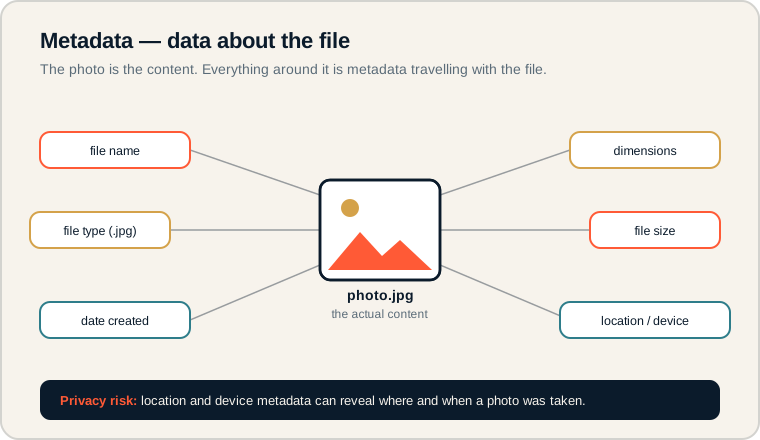
A photo in the center surrounded by the metadata that travels with it.
The image in the middle is the content. Each label around it, such as file name, type, size, date, dimensions, and location/device, is metadata. Read the warning bar at the bottom: location and device metadata can expose private information. On the exam, separate the content from the data that describes it.
Describing files.
Common metadata fields to recognize.
- Metadata: data that describes other data.
- File type: the format of a file, such as .jpg or .mp3.
- File size: how much storage the file uses.
- Timestamp: the date and time a file was created or changed.
- Location data: GPS coordinates recorded with some files.
- Author/device data: who or what created the file.
Memory hook: If it describes the file rather than being the file, it is metadata.
How metadata is tested.
Usefulness and privacy both appear.
Be ready to:
- Identify examples of metadata for a file.
- Explain how metadata helps organize, search, and filter data.
- Describe a privacy risk created by metadata, such as location.
- Recognize that metadata is separate from the file's main content.
AP CSP connects metadata to real computing innovations: photo apps sort by date and place, music apps filter by length, and search engines use metadata to find files. Expect questions that balance usefulness against privacy.
Exam tip: When a question mentions sharing a photo or file, check whether hidden metadata like location could reveal something private.
Uploading a photo to a project website.
Identify the metadata and the privacy risk.
A student takes a photo on a phone and uploads it to a class project website. What metadata might be attached, and what is the risk?
Likely metadata: file name, file type (.jpg), file size, dimensions, the date and time the photo was taken, the device model, and possibly GPS location.
Privacy risk: if the photo was taken at the student's home and location data is attached, uploading it could reveal where they live, even though the picture itself shows nothing sensitive. Anyone who downloads the file could read that metadata.
A responsible step is to remove or disable location metadata before sharing. The visible content can look harmless while the hidden metadata still exposes private information.
Metadata misconceptions.
These misunderstandings are common and risky.
- Thinking metadata is the main content. It describes the file; it is not the file itself.
- Forgetting it can reveal private information. Location and device data can expose a lot.
- Assuming deleting visible content removes metadata. Hidden metadata can remain in a file.
- Ignoring metadata when organizing data. It is what makes searching and sorting possible.
- Confusing metadata with encryption. Metadata describes data; encryption protects it. They are different.
Reframe: Metadata is a quiet label attached to every file, helpful for finding things, but worth checking before you share.
Common metadata fields.
What each field tells you.
| Field | What it describes | Example |
|---|---|---|
| File name | What the file is called | project-photo.jpg |
| File type | The file's format | .jpg |
| File size | Storage space used | 2.4 MB |
| Timestamp | When it was created or edited | 2025-06-01 14:30 |
| Location data | Where it was created | GPS coordinates |
| Author/device data | Who or what made it | Phone model |
Check metadata before you share.
A habit that protects privacy and earns exam points.
Before uploading a file, ask what metadata travels with it and whether any of it, especially location, should be removed. Being able to name both a benefit (organizing, searching) and a risk (privacy) of metadata is exactly the balanced reasoning AP CSP looks for.
Try it: Think of a song file and a document. List two metadata fields for each and one way that metadata could be useful or risky.
Practice — attempt these now.
AP-style assessments aligned to this lesson. Time them.
AP CSP Big Idea 2 Topic 6: Metadata — Set 1
AP-style topic practice assessment
AP CSP Big Idea 2 Topic 6: Metadata — Set 2
AP-style topic practice assessment
AP CSP Big Idea 2 Topic 6: Metadata — Set 3
AP-style topic practice assessment